Neon Vision Editor: Lean Coding for Apple Users
Lightweight text editor offers macOS, iPhone, and iPad users a streamlined alternative to bulky IDEs.

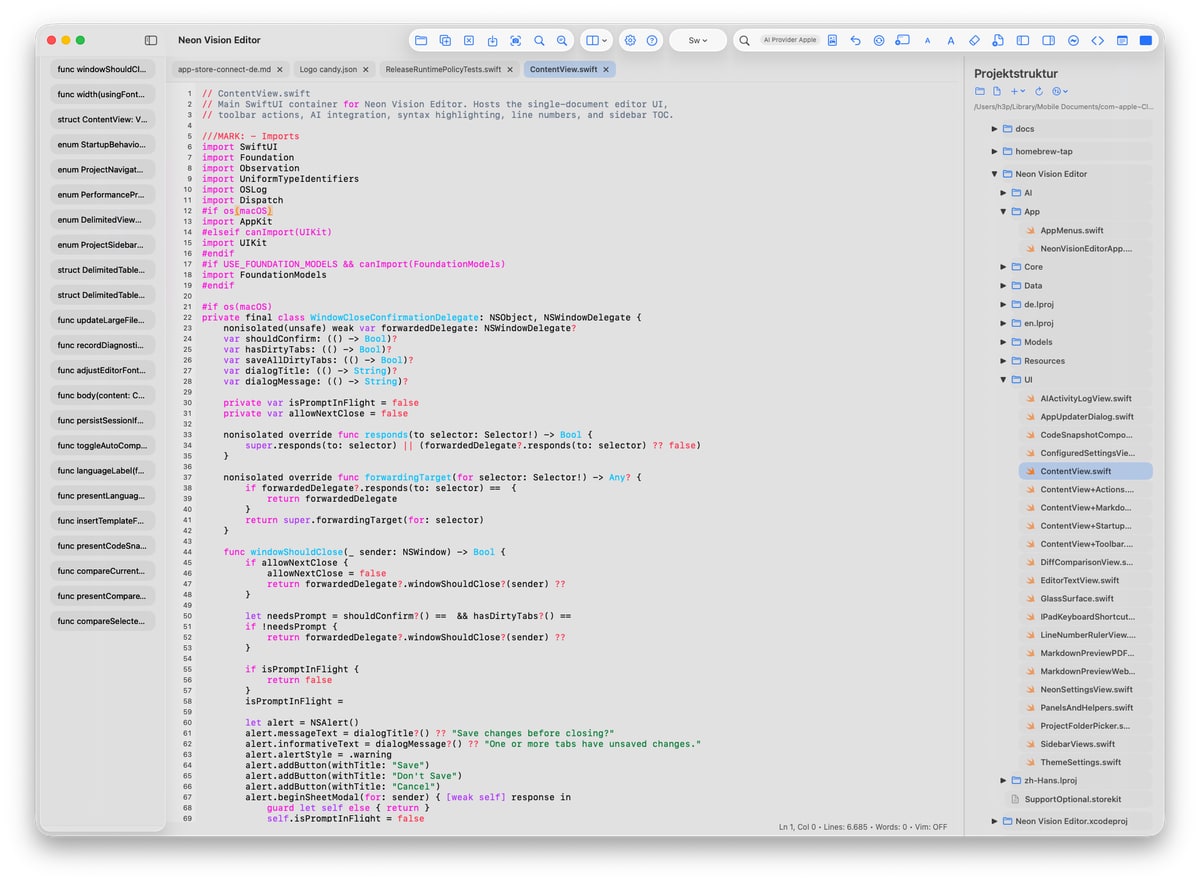
Neon Vision Editor: A Lean Alternative to Bulky IDEs
In the ever-evolving landscape of software development, where tools and environments expand with increasing complexity, finding a lean yet powerful text editor is like discovering a hidden gem. Enter Neon Vision Editor, an open-source creation by Hilthart Pedersen, designed specifically for Apple users. This tool caters to developers looking for a minimalist approach to editing text, markdown, JSON files, or code snippets across macOS, iPhone, and iPad. It delivers just what you need without the baggage.
A Tool for Focused Editing
When you think of integrated development environments (IDEs), colossal names like Visual Studio Code and Xcode often come to mind. These platforms are packed with features, from project management capabilities to complex plugin systems. While they are powerful, they can also be overwhelming and resource-intensive, which is precisely where Neon Vision Editor finds its niche. It strips down to the essentials, allowing users to open, read, modify, and save files without the need for a full-blown IDE.
Neon Vision Editor is ideal for developers who need to quickly dive into code snippets, log files, or extensive text documents but prefer to avoid the overhead associated with traditional IDEs. It doesn't aim to replace these robust environments but rather complements them by offering a streamlined solution for those simple, everyday tasks. The lack of background services and resource-heavy features means less strain on your system, making it a practical choice for developers on the go.
Availability and Features
Neon Vision Editor is readily accessible, available for download on GitHub and the App Store. The GitHub repository not only offers the app but also provides additional insights, including a handy list of keyboard shortcuts that enhance its usability. This accessibility underscores its commitment to being a tool that developers can easily integrate into their workflow.
The editor boasts several features that make it particularly appealing:
- Simple, Intuitive Interface: Its clean design reduces distractions, allowing for a focused editing experience.
- Efficient Navigation: A file structure sidebar simplifies moving through projects without the complexity of full-scale IDEs.
- Cross-Platform Compatibility: Seamlessly operates across macOS, iOS, and iPadOS, ensuring a consistent experience.
Context: The European Tech Scene
In Europe, where tech regulation often emphasizes simplicity and transparency, tools like Neon Vision Editor are gaining traction. The European Union's focus on privacy and open-source software aligns well with Neon Vision Editor's approach. Developers who value these principles will find this editor a compelling choice, as it resonates with the broader movement towards transparent, user-focused software solutions.
Moreover, the open-source nature of Neon Vision Editor embodies the spirit of collaboration and innovation prevalent in the European tech scene. It offers developers the flexibility to adapt and contribute to the tool, tailoring it to meet specific needs while ensuring ongoing improvement through community engagement.
What This Means for You
For Apple users, particularly those who frequently work on the move with an iPhone or iPad, Neon Vision Editor presents a viable alternative to more cumbersome IDEs. The ability to quickly launch the app and start working without enduring long startup times or navigating through unnecessary features can significantly enhance productivity.
If you often find yourself bogged down by applications that do too much, Neon Vision Editor's minimalist design can streamline your workflow. It's an excellent choice for those who appreciate a tool that does one thing well without overcomplicating the process. By focusing on the essentials, it allows you to maintain a clear, distraction-free workspace.
What's Still Unclear
While Neon Vision Editor certainly delivers a streamlined experience, several questions remain unanswered. The long-term support for the tool is yet to be determined. How frequently will updates or new features be released? This remains a crucial consideration for users who rely on regular improvements and bug fixes.
Additionally, while Neon Vision Editor stands out as a lightweight option, it hasn't yet been fully evaluated against other similar tools like CotEditor. A thorough comparison could provide insights into its performance relative to other editors in the same category. As users adopt the tool and provide feedback, these evaluations are likely to emerge, offering a clearer picture of its standing in the market.
Why This Matters
Neon Vision Editor addresses a significant need in the software development community: the demand for efficient, no-frills tools that cut through the clutter of over-engineered software. By offering a fast, efficient way for Apple users to handle everyday coding tasks, it provides a refreshing departure from the norm.
In a landscape where software bloat is common, the minimalist approach of Neon Vision Editor isn't just a novelty—it's a necessity. For developers seeking speed and simplicity, it represents a welcome shift towards more focused, user-centric design.
In the end, while Neon Vision Editor may not replace your heavy-duty IDE, it serves as a valuable addition to your toolkit, ensuring that when simplicity is the order of the day, you have just the right tool at your fingertips. As the tech world continues to evolve, such lean solutions will likely become increasingly important for developers navigating a complex digital environment.
Discuss this story
Got a take, a correction, or a follow-up tip? Reply where you read — we read everything.
Found an error? File a correction at /corrections. Substantive corrections are logged publicly.
One short email. The most important Software news, fact-checked, no fluff. Free, unsubscribe anytime.
More from Software
Proton VPN vs NordVPN: Which One Earns Your Subscription?
A deep dive into Proton VPN and NordVPN, comparing their privacy, performance, features, and value, helping you make an informed decision.
Notion vs Obsidian: Which Knowledge Hub Fits Your Workflow?
Deciding between Notion and Obsidian? We break down the core differences in philosophy, data ownership, collaboration, and extensibility to help you choose.
Proton Mail vs Gmail: Which Email Service Fits Your Digital Life?
Unsure about Proton Mail vs Gmail? We break down security, features, pricing, and daily use so you can confidently pick the email service that aligns with your priorities.

Apple's Beta Updates: Enhancements, Challenges, and Future Outlook
Exploring the latest beta updates from Apple for tvOS, macOS, and visionOS, including key features and performance issues.
The Byte-Pulse Newsroom is the editorial system that produces Byte-Pulse's daily tech news coverage. Each story is cross-referenced across 3+ independent outlets, drafted with AI assistance by the newsroom system (Drafter → Editor → Fact-Checker → Polisher), and reviewed by Serhat Er, Editor-in-Chief, before publication. We disclose AI augmentation openly. Editorial accountability stays with the named editor on every article. Tips: editorial@byte-pulse.net.
Don’t miss these
Xiaomi 16 Pro vs iPhone 18 Pro: Which Flagship Fits Your World?
Deciding between the Xiaomi 16 Pro and iPhone 18 Pro? We break down every spec and trade-off, so you can make the choice that's right for you.
Perplexity Pro vs ChatGPT Plus: Which AI Assistant Fits Your Workflow?
This guide lays out the strengths and approaches of Perplexity Pro and ChatGPT Plus, helping you identify which AI assistant aligns with your specific needs.

Pokémon TCG Movie Signals Strategic Media Pivot for The Pokémon Company
A new Pokémon movie focused on the TCG is coming in 2027, marking a strategic pivot for the franchise as it navigates massive global fan engagement and logistical challenges.

Apple's AI Pivot: Vision Pro Content Cut, Siri Rebuilt Amid Layoffs
Apple's latest layoffs signal a strategic pivot, dialing back high-cost Vision Pro content while re-tooling Siri for the AI era. What's next for Apple?

D23 2026: Disney's Content Deluge Sparks Questions About Strategy
Byte-Pulse cuts through D23 hype: We dissect Disney's ambitious content slate, from Simpsons: Hit & Run to Ahsoka season 2, and question the real-world implications and European market strategy.
Motorola Edge 60 Ultra vs OnePlus 13: Which Android Flagship Fits Your Priorities?
Motorola Edge 60 Ultra and OnePlus 13 both aim for top-tier Android. We cut through the marketing to reveal the true differences, helping you choose.