ChatGPT Now Integrated Directly Into PowerPoint Beta
OpenAI's ChatGPT now enhances PowerPoint slides with AI-driven content creation.

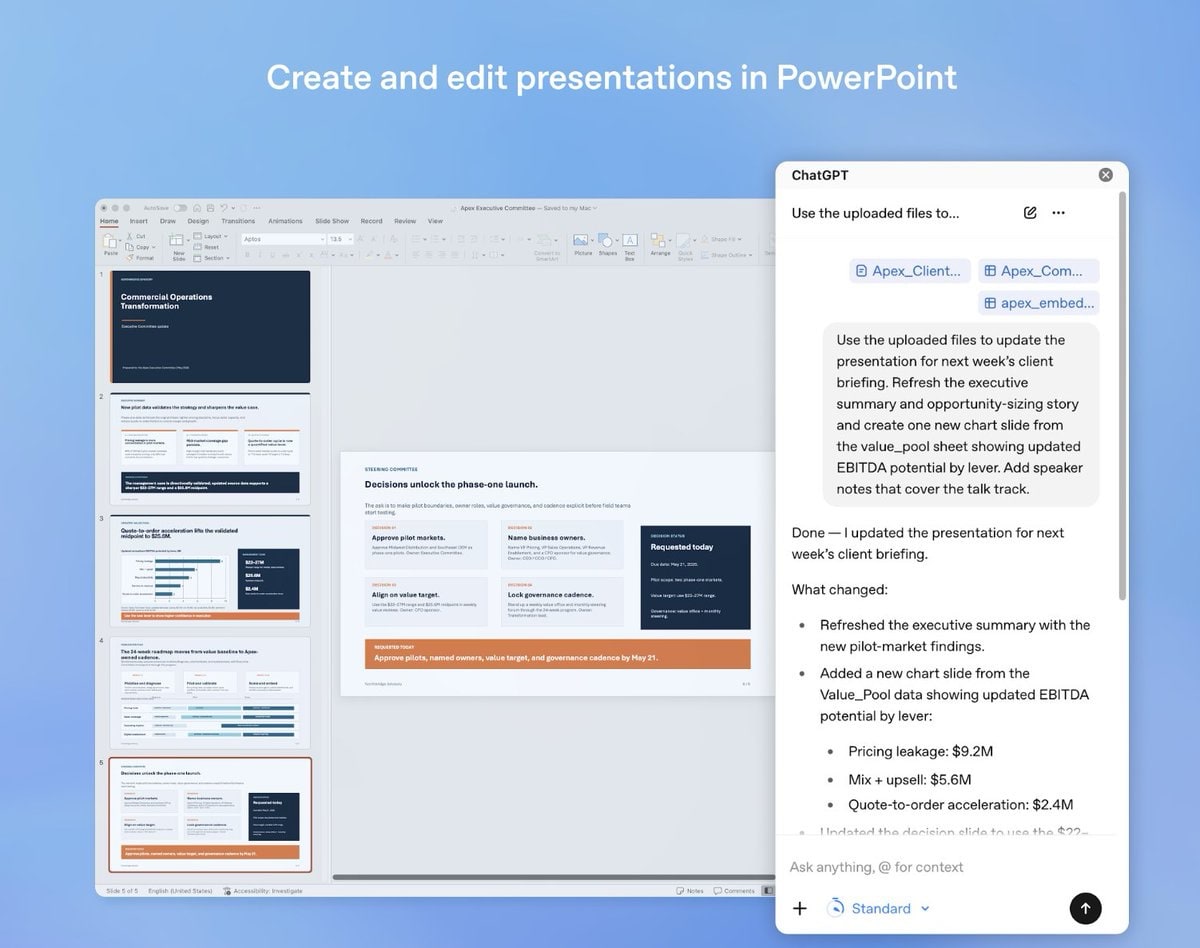
OpenAI has taken a significant step by integrating its AI model, ChatGPT, directly into Microsoft PowerPoint. This new feature is currently in its beta phase and is accessible to all types of users, right from those with free accounts to those subscribed to Plus, Pro, Business, Enterprise, and Educational versions.
The ChatGPT integration allows users to create new slides or revamp existing presentations within PowerPoint. Users can input notes, documents, or spreadsheets, which ChatGPT then converts into editable slides. The AI assists in polishing text, restructuring hierarchies, and adding new sections as needed. Beyond creation, ChatGPT serves as an analytical tool, identifying weaknesses in arguments, summarizing key points, and tailoring slides specifically for executive presentations.
Control remains entirely with the user, as all changes can be reviewed and manually adjusted within PowerPoint. Installation is straightforward through the 'Add-ins' section on the 'Home' tab, followed by searching and adding ChatGPT for PowerPoint, and then signing in with an OpenAI account.
Key Features of ChatGPT for PowerPoint:
- Transforms notes and documents into editable slides
- Polishes existing text and restructures presentations
- Analyzes content for weaknesses and summarizes key points
- Tailors slides for executive presentations
A Real-World Scenario:
Imagine you're preparing for a critical quarterly business review meeting. Your team has gathered data from multiple sources, including spreadsheets, written notes, and various documents. Traditionally, compiling this information into a coherent and engaging PowerPoint presentation would take hours, if not days. With ChatGPT integrated into PowerPoint, you can input all your raw data and notes, and the AI will assist in creating a professional presentation.
For example, you can drop in a CSV file with sales data, a Word document with strategic notes, and a PDF of the latest market analysis. ChatGPT swiftly processes this information, crafting slides with key trends, insights, and narrative flow that aligns with your meeting goals. This not only saves time but can also enhance the clarity and impact of your presentation.
What This Means for You:
If you're a frequent PowerPoint user, this integration could save you considerable time in creating and refining presentations. The AI-driven suggestions can enhance the quality of your slides, potentially making your presentations more impactful and professional. Imagine walking into a boardroom confident that your slides are not only accurate but also engaging, thanks to AI's ability to highlight key data and suggest improvements.
Moreover, the ability to tailor presentations specifically for different audiences is a game-changer. If you're presenting to executives, ChatGPT can emphasize strategic insights and high-level summaries, ensuring that your message resonates with decision-makers. This level of customization was previously time-consuming and required a deep understanding of both the content and the audience.
Context:
This move by OpenAI underscores the growing trend of AI integration into everyday tools, enhancing productivity and creativity. In Europe, where GDPR and data privacy are significant concerns, having such tools integrated into widely-used applications like PowerPoint could streamline compliance and increase adoption rates. Organizations can benefit from AI-driven insights while maintaining control over their data and presentation content.
What's Still Unclear:
While this beta phase is promising, it remains to be seen how well ChatGPT can handle complex and diverse content types across different industries. For instance, technical fields like engineering or medicine require precise terminology and detailed explanations that may challenge the AI's comprehension capabilities. Additionally, the scope of language support and the handling of non-English content are yet to be detailed. For global companies, this will be a crucial factor in determining the tool's utility.
Why This Matters:
AI in Productivity Tools Revolutionizes Workflow — By integrating ChatGPT into PowerPoint, OpenAI is not only making AI more accessible but also setting a precedent for other productivity tools. As AI continues to enhance everyday applications, the potential for increased efficiency and creativity in the workplace grows exponentially. Businesses can operate more nimbly, with faster turnaround times on presentations and reports, potentially leading to quicker decision-making and a competitive edge in the marketplace.
Looking forward, this integration could pave the way for AI to become a standard feature in all productivity software. As each iteration improves, we may see AI taking on more sophisticated roles in our workflows, from automating mundane tasks to providing strategic insights that were previously difficult to unearth. For now, the integration of ChatGPT with PowerPoint is a promising start towards a future where AI and human creativity work hand-in-hand to achieve new heights in productivity and innovation.
Discuss this story
Got a take, a correction, or a follow-up tip? Reply where you read — we read everything.
Found an error? File a correction at /corrections. Substantive corrections are logged publicly.
One short email. The most important AI news, fact-checked, no fluff. Free, unsubscribe anytime.
More from AI
Perplexity Pro vs ChatGPT Plus: Which AI Assistant Fits Your Workflow?
This guide lays out the strengths and approaches of Perplexity Pro and ChatGPT Plus, helping you identify which AI assistant aligns with your specific needs.
Claude Pro vs Google Gemini Advanced: Which AI Assistant Deserves Your Subscription?
This definitive guide cuts through the marketing to give you a fair, balanced breakdown of Claude Pro and Gemini Advanced, letting you decide which AI best fits your workflow.
Claude Pro vs Google Gemini Advanced: Which AI Actually Earns Your Subscription?
Byte-Pulse lays out the real trade-offs between Claude Pro and Google Gemini Advanced, helping you pick the AI that fits your workflow, without picking for you.
ChatGPT Plus vs Google Gemini Advanced: Which AI Assistant Fits Your Workflow?
Deciding between ChatGPT Plus and Google Gemini Advanced? We break down the models, features, integrations, and pricing to help you align your choice with your specific priorities.
The Byte-Pulse Newsroom is the editorial system that produces Byte-Pulse's daily tech news coverage. Each story is cross-referenced across 3+ independent outlets, drafted with AI assistance by the newsroom system (Drafter → Editor → Fact-Checker → Polisher), and reviewed by Serhat Er, Editor-in-Chief, before publication. We disclose AI augmentation openly. Editorial accountability stays with the named editor on every article. Tips: editorial@byte-pulse.net.
Don’t miss these
Asus ROG Phone 9 vs Sony Xperia 1 VII: Which Niche Flagship Earns Your Money?
Deciding between the gaming-focused ROG Phone 9 and the creator-centric Xperia 1 VII? This guide breaks down every spec to help you choose.
Proton VPN vs NordVPN: Which One Earns Your Subscription?
A deep dive into Proton VPN and NordVPN, comparing their privacy, performance, features, and value, helping you make an informed decision.

Pokémon TCG Movie Signals Strategic Media Pivot for The Pokémon Company
A new Pokémon movie focused on the TCG is coming in 2027, marking a strategic pivot for the franchise as it navigates massive global fan engagement and logistical challenges.

Apple's AI Pivot: Vision Pro Content Cut, Siri Rebuilt Amid Layoffs
Apple's latest layoffs signal a strategic pivot, dialing back high-cost Vision Pro content while re-tooling Siri for the AI era. What's next for Apple?

D23 2026: Disney's Content Deluge Sparks Questions About Strategy
Byte-Pulse cuts through D23 hype: We dissect Disney's ambitious content slate, from Simpsons: Hit & Run to Ahsoka season 2, and question the real-world implications and European market strategy.
Honor Magic 8 Pro vs Samsung Galaxy S26 Ultra: Which Future Flagship Fits Your Wallet and Workflow?
Deciding between the anticipated Honor Magic 8 Pro and Samsung Galaxy S26 Ultra? Our deep dive into expected specs and features provides the fair comparison you need.