Gemini Just Got a New 'Effort' Setting: More Control Over Google's AI
Users can now dial up or down how much 'effort' Gemini puts into its answers, offering 'Standard' or 'Advanced' depths.

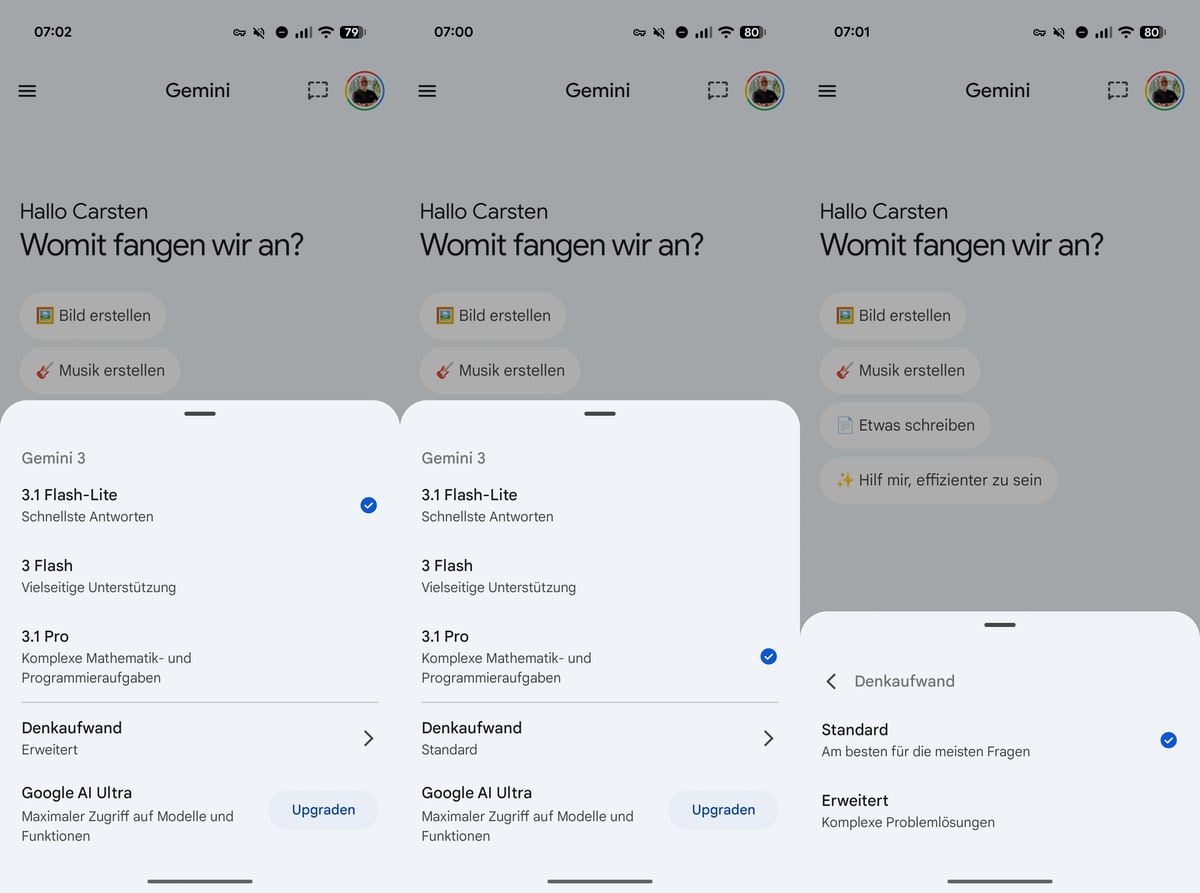
Want more control over your AI? Google just dropped a new feature in its Gemini app that lets you tweak the 'effort' level of its responses. You'll find it right there in the model selection menu: 'Standard' or 'Advanced'.
New 'Effort' Settings Unveiled
So, what's it do? This new setting works for both Gemini 3 Flash and the beefier Gemini 3.1 Pro models. Pick 'Standard' or 'Advanced,' and you pretty much tell the AI how deep to go with your questions. It's about tailoring your AI experience, right? And yeah, it could affect both how fast you get an answer and how detailed it is.
It's all about balancing speed and detail. Need a quick answer? Go 'Standard.' Want the full rundown? 'Advanced' is your play.
Rollout and Unanswered Questions
Some folks are already seeing this option. But honestly, we don't know when Google plans to roll it out to everyone. The company hasn't said if this adjustment will actually slow down the app, which, let's be real, could really impact how happy users are.
Here's the gist: 'Standard' mode means quick, basic answers. 'Advanced' gets you those in-depth, detailed responses. It's all about giving you more control over your AI interactions.
This feature adds more ways to customize Google's AI. And as AI becomes more and more a part of our daily lives, options like this, giving users better control? Pretty vital, actually.
The European Angle
This all comes amid a pretty strong push from European tech users who are keen on customizable AI. The EU, remember, is big on AI ethics and user control. So, Google's new feature? It kinda fits right in with what Europe's been asking for: more transparency, more customizability in its AI tools.
What This Means For You
If you're using Gemini, this update could change how you use AI, making it feel more personal. Need a quick answer? Or a deep dive? Adjusting that 'effort' level means the AI works for your needs.
What We Still Don't Know
But some questions are still up in the air. Will 'Advanced' mode actually slow down response times? And how much will it hit your phone's battery? Google hasn't given us the specifics on any of that yet.
Why This Matters
So, why does this matter? Google's Gemini update is a pretty big deal for making AI more about the user. As these AI tools pop up everywhere, features that let you personalize how you interact? They're crucial. People have different needs, right?
Discuss this story
Got a take, a correction, or a follow-up tip? Reply where you read — we read everything.
Found an error? File a correction at /corrections. Substantive corrections are logged publicly.
One short email. The most important AI news, fact-checked, no fluff. Free, unsubscribe anytime.
More from AI

Perplexity Pro vs ChatGPT Plus: Which AI Assistant Fits Your Workflow?
This guide lays out the strengths and approaches of Perplexity Pro and ChatGPT Plus, helping you identify which AI assistant aligns with your specific needs.

Claude Pro vs Google Gemini Advanced: Which AI Assistant Deserves Your Subscription?
This definitive guide cuts through the marketing to give you a fair, balanced breakdown of Claude Pro and Gemini Advanced, letting you decide which AI best fits your workflow.

Claude Pro vs Google Gemini Advanced: Which AI Actually Earns Your Subscription?
Byte-Pulse lays out the real trade-offs between Claude Pro and Google Gemini Advanced, helping you pick the AI that fits your workflow, without picking for you.

ChatGPT Plus vs Google Gemini Advanced: Which AI Assistant Fits Your Workflow?
Deciding between ChatGPT Plus and Google Gemini Advanced? We break down the models, features, integrations, and pricing to help you align your choice with your specific priorities.
The Byte-Pulse Newsroom is the editorial system that produces Byte-Pulse's daily tech news coverage. Each story is cross-referenced across 3+ independent outlets, drafted with AI assistance by the newsroom system (Drafter → Editor → Fact-Checker → Polisher), and reviewed by Serhat Er, Editor-in-Chief, before publication. We disclose AI augmentation openly. Editorial accountability stays with the named editor on every article. Tips: editorial@byte-pulse.net.
Don’t miss these

Samsung Galaxy Watch 8 Ultra vs Apple Watch Ultra 3: Which Adventure Companion Earns Its Premium Price?
Considering a top-tier smartwatch? This guide lays out the anticipated strengths and trade-offs of the Samsung Galaxy Watch 8 Ultra and Apple Watch Ultra 3, helping you decide based on your priorities.

Notion vs Obsidian: Which Knowledge Hub Fits Your Workflow?
Deciding between Notion and Obsidian? We break down the core differences in philosophy, data ownership, collaboration, and extensibility to help you choose.

Lenovo Legion Go S vs. ASUS ROG Ally X: Which Next-Gen Handheld Earns a Spot in Your Backpack?
Deciding between the Legion Go S and ROG Ally X? We break down every spec, every design choice, and every trade-off without picking a winner. Your perfect gaming handheld is here.

Apple M5 Pro vs. Apple M4 Pro: Projecting the Next Generation of Apple Silicon
We project the likely advancements of the unannounced M4 Pro and M5 Pro chips, offering a balanced, speculative look at future performance and efficiency.

Nothing Ear (3) vs AirPods 4 ANC: The Right Earbuds For Your Ears
We cut through the hype to compare the rumored Nothing Ear (3) and AirPods 4 ANC, laying out the real trade-offs so you can decide for yourself.

Steam Deck OLED vs MSI Claw 8 AI+: Which Handheld PC Earns Your Wallet?
Deciding between Valve's acclaimed handheld and MSI's latest Intel-powered challenger? We break down the specs, performance, and experience to help you choose your ideal portable gaming machine.