Google's Selfie Login: Convenience Meets Data Privacy Alarms
Google's new video selfie option for account recovery sparks debate on biometric data collection and AI training

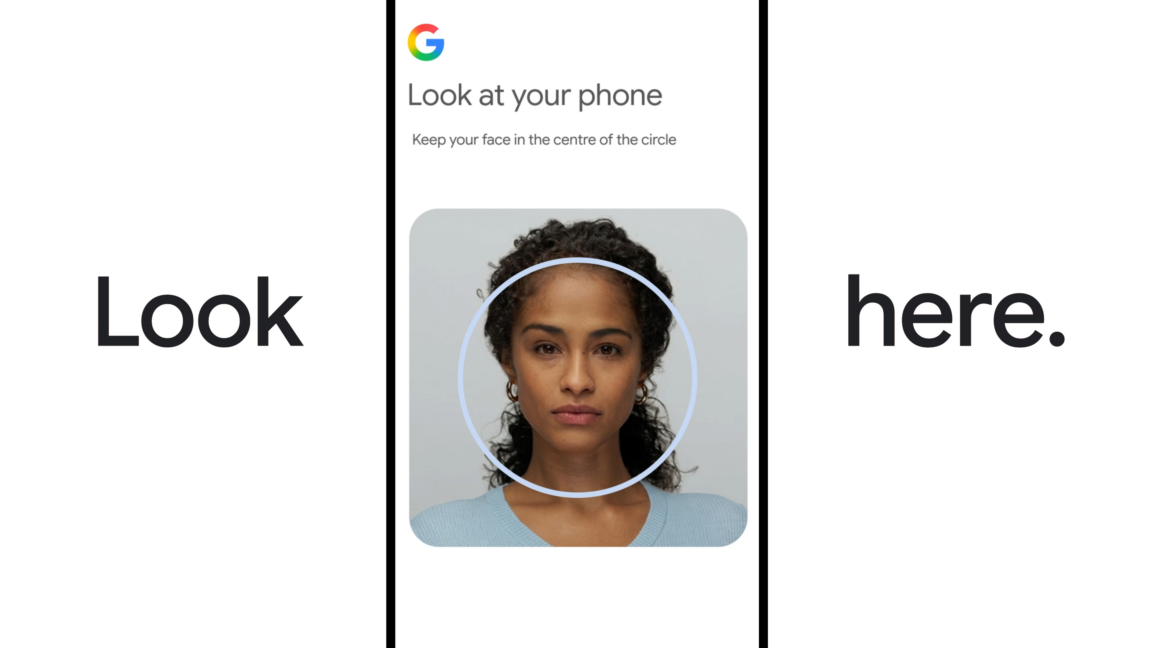
Google is introducing a new method for users to regain access to their accounts: a video selfie. This isn't a replacement for your password or passkey, but rather an additional recovery option, positioned as a digital 'spare key' for those moments when you're locked out or don't have access to your usual devices.
Why passwordless logins are gaining traction
The push towards passwordless authentication isn't new; it's a long-standing industry trend driven by the inherent weaknesses of traditional passwords. For years, passwords have been the weakest link in digital security, prone to phishing, brute-force attacks, and simple human forgetfulness. As TechCrunch aptly puts it, Google is "joining a growing wave of tech companies betting that biometrics and not passwords are the future of identity verification online."
However, the critical distinction here is that while passkeys keep biometric data on your device, Google's selfie video stores it on their servers. This shift in data residency is not a trivial detail; it fundamentally alters the risk profile for users and, frankly, for Google.
How Google's selfie video verification works
The setup process for Google's selfie video login is designed to be user-friendly, as Wired's Reece Rogers noted, completing it "in less than five minutes." Users navigate to their Google account's Security & sign-in tab and, if available, find the new option. The process involves recording a short video of your face, guided by prompts to perform simple head movements – turning left, right, or nodding – to capture multiple angles.
Once this initial video is stored, encrypted, on Google's servers, it acts as your biometric reference. Should you find yourself locked out in the future, you can initiate a recovery process by taking another selfie video. Google's system then compares this new video to your saved one, employing "multiple layers of security" and "liveness detection" to ensure it's a real person and not a deepfake or a static image, as detailed by TechCrunch and 9to5Mac.
What data Google collects and how it's used
Google states that the selfie videos are "stored securely using encryption and remain protected even when they’re not being used," and users can "choose to delete the videos from their Google account at any time," as confirmed by TechCrunch and 9to5Mac. By default, the video is used solely for login purposes. However, there is an optional toggle during setup that allows Google to use your selfie video to "develop and improve our facial recognition, age estimation, and other verification methods that use your physical features or movement, across Google services."
This optional opt-in fundamentally changes the privacy calculus. While Google assures that it's not required for the recovery feature, and that the video won't be used for other purposes if unchecked, the very existence of this option indicates a strategic intent. Google is not just offering a convenience; it's also seeking to build one of the largest datasets for facial recognition training in the world, leveraging its massive user base.
Who can and cannot use the selfie login
Google's new selfie video login is rolling out globally to "most accounts," according to Wired, but it's not universally available. Ars Technica specifically points out that the feature cannot be configured for:
- Workspace accounts
- Child accounts
- Any account enrolled in Google’s Advanced Protection Program
This exclusion list is telling. The Advanced Protection Program is designed for users at high risk of targeted attacks, such as journalists, activists, and government officials. The fact that Google is not offering this biometric login method to its most security-conscious users suggests an acknowledgement of the inherent risks or complexities involved with storing and processing biometric data.
The security trade-offs of facial recognition
The promise of facial recognition as a secure authentication method is compelling, yet the trade-offs are substantial. On one hand, it offers a level of convenience and resistance to common password attacks that traditional methods cannot match. Google's focus on "liveness detection" aims to mitigate the threat of deepfakes and spoofing, which is a critical consideration as AI manipulation becomes more sophisticated.
However, the centralisation of biometric data, even encrypted, represents a single point of failure. If Google's servers were ever compromised – a scenario no company, regardless of their security claims, can entirely rule out – the implications of having millions, potentially billions, of users' facial biometric data could be catastrophic. Unlike a password, which can be changed, your face cannot.
Why this matters
Google's selfie video login is more than just a convenient way to recover your account; it represents a significant step in the ongoing shift towards biometric identity verification. While the immediate benefit of simplifying account recovery is clear, the long-term implications of collecting, storing, and potentially using such sensitive data for AI training are profound. For Byte-Pulse readers, particularly those operating within the EU, understanding these underlying dynamics is crucial. This isn't just about logging in; it's about the future of your digital identity, the security of your most personal data, and the quiet expansion of corporate data collection for AI development. We, as users, must remain vigilant and demand transparency, ensuring that convenience does not come at the cost of fundamental privacy rights.
Sources cross-referenced
This story was synthesised from reporting by 4 outlets:
1. Ars Technica 2. TechCrunch 3. Wired 4. 9to5Mac
Hardware keys and password managers used by security pros.
Shop security gear →Discuss this story
Got a take, a correction, or a follow-up tip? Reply where you read — we read everything.
Found an error? File a correction at /corrections. Substantive corrections are logged publicly.
One short email. The most important Security news, fact-checked, no fluff. Free, unsubscribe anytime.
More from Security

eBay's $55.7M Cyberstalking Settlement: A Corporate Culture of Coercion Exposed
Byte-Pulse investigates the eBay cyberstalking case, revealing a disturbing harassment campaign, executive involvement, and the broader implications for corporate ethics.

Apple's Rare Third macOS RC: Unpacking Security Concerns
Byte-Pulse explores the implications of Apple's unusual third Release Candidate for macOS updates, examining the severity of unannounced security fixes and their impact on European users
Google’s Legal Battle Against AI-Driven Cybercrime: Examining Outsider Enterprise
Google's lawsuit against Outsider Enterprise exposes differences in victim counts and sheds light on AI's role in cybercrime.

iOS 26.5 Update Addresses Over 50 Security Vulnerabilities—Update Now
Apple's iOS 26.5 fixes over 50 security flaws. Update your iPhone now to stay secure.
The Byte-Pulse Newsroom is the editorial system that produces Byte-Pulse's daily tech news coverage. Each story is cross-referenced across 3+ independent outlets, drafted with AI assistance by the newsroom system (Drafter → Editor → Fact-Checker → Polisher), and reviewed by Serhat Er, Editor-in-Chief, before publication. We disclose AI augmentation openly. Editorial accountability stays with the named editor on every article. Tips: editorial@byte-pulse.net.
Don’t miss these
AMD Ryzen 7 9800X3D vs Intel Core Ultra 7 265K: Which Chip Drives Your Next Build?
Deciding between AMD's V-Cache prowess and Intel's new Ultra architecture? This guide cuts through the noise to show you what each CPU truly offers for your money.
Asus ROG Phone 9 vs Sony Xperia 1 VII: Which Niche Flagship Earns Your Money?
Deciding between the gaming-focused ROG Phone 9 and the creator-centric Xperia 1 VII? This guide breaks down every spec to help you choose.
Proton VPN vs NordVPN: Which One Earns Your Subscription?
A deep dive into Proton VPN and NordVPN, comparing their privacy, performance, features, and value, helping you make an informed decision.
AMD Ryzen 9 9950X3D vs Intel Core Ultra 9 285K: Next-Gen Desktop Showdown
A deep dive into the expected strengths of AMD's Zen 5 X3D and Intel's next-gen Core Ultra K-series, laying out the trade-offs for serious buyers.
Honor Magic 8 Pro vs Samsung Galaxy S26 Ultra: Which Future Flagship Fits Your Wallet and Workflow?
Deciding between the anticipated Honor Magic 8 Pro and Samsung Galaxy S26 Ultra? Our deep dive into expected specs and features provides the fair comparison you need.
Notion vs Obsidian: Which Knowledge Hub Fits Your Workflow?
Deciding between Notion and Obsidian? We break down the core differences in philosophy, data ownership, collaboration, and extensibility to help you choose.