iPad's Math Notes: Beyond Basic Calculator
Apple's Math Notes on iPad empowers users with dynamic calculations.

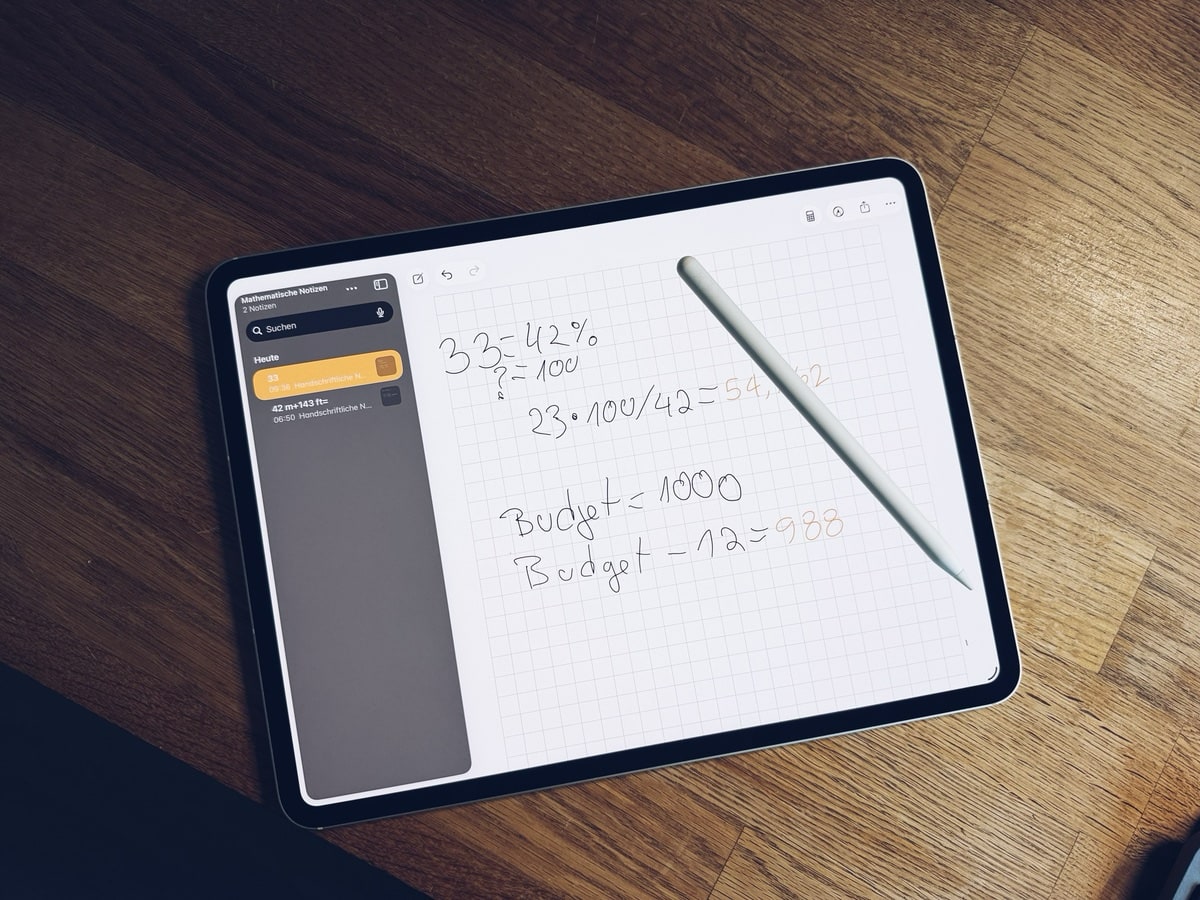
iPad's Math Notes Feature Simplifies Calculations
Apple has quietly integrated a powerful tool into its iPad lineup: Math Notes. While not a brand-new feature, it remains under the radar for many users. Designed to go beyond a simple calculator, Math Notes offers a dynamic way to handle mathematical tasks, perfect for both educational and professional environments.
A Calculatory Evolution
Unlike the basic calculator app many are familiar with, Math Notes allows for both typed and handwritten calculations using the Apple Pencil. Whether you're budgeting an event, remodeling a home, or assisting with homework, this feature offers a versatile approach to problem-solving.
The app supports both horizontal and vertical calculations. For example, typing "15 + 34 =" instantly provides the result. You can also write numbers vertically, drawing a line beneath them to sum them up. The app respects mathematical precedence rules, such as order of operations, and can even automatically convert mixed units. Imagine working on a home renovation project where costs are denominated in multiple currencies and units, and Math Notes seamlessly converts these into a coherent total.
Real-time updates are a standout feature, allowing users to adjust numbers and see immediate changes in outcomes, which is particularly beneficial for dynamic calculations involving variables. This capability is especially useful in scenarios such as a classroom setting where students can explore mathematical concepts interactively, or in business meetings where budget scenarios are frequently altered on the fly.
Dynamic Interaction and Variables
One of the most innovative aspects of Math Notes is its interactive capabilities. Users can tap any number within a calculation to adjust it using a "scrubber" slider. This is especially useful for exploring different scenarios without needing to redo entire calculations. For instance, a project manager can quickly assess the impact of increasing a budget line item by simply moving a slider, watching as overall costs adjust in real-time.
For more complex tasks, users can declare variables by simply writing them alongside a value, like "Budget = 500." These variables can then be used in future calculations. However, it's crucial to define them before using them in subsequent equations. In a day-to-day setting, this feature is invaluable for students and professionals alike who deal with formulaic calculations, enabling them to set constants and manipulate them as needed.
Customization and User Control
Users who prefer a more hands-on approach can choose how the app presents solutions. Options range from automatic result display to a more manual approach where results appear only when prompted. This flexibility allows for a tailored experience, catering to users who may prefer a more traditional method of checking their work as they go.
For those who prefer a different aesthetic, Math Notes allows switching from a default dark background to a lighter one, complete with optional lines and grids. This customization ensures a comfortable user experience tailored to individual preferences, whether you're working late at night or in a brightly lit classroom.
Context: European Perspective
In the European educational landscape, tools like Math Notes could revolutionize how students approach problem-solving, offering a digital alternative to traditional pen-and-paper methods. As educational institutions increasingly integrate technology into curriculums, such features align well with the EU's push towards digital literacy. The potential for language integration and conversion of units within Math Notes further enhances its applicability across diverse European educational systems.
What this Means for You
For iPad users, Math Notes offers a robust solution for both simple and complex mathematical needs. Whether you're a student needing a flexible tool for homework or a professional seeking dynamic budgeting options, this feature can streamline your workflow and save time. Imagine a university student who can now handle complex physics calculations with ease or a small business owner who can adjust financial forecasts during client meetings.
What's Still Unclear
The extent to which Apple plans to expand Math Notes' capabilities remains unknown. Will future updates include advanced functions like graphing complex equations or integrating with other educational apps? While the current feature set is impressive, the potential for growth could see Math Notes becoming a cornerstone tool for both personal and academic use. Users hope for integration with other iOS apps, perhaps allowing seamless sharing of calculations to apps like Numbers or Pages.
Why this Matters
Math Notes on iPad could redefine digital calculations for personal and educational use. By offering real-time interaction and variable management, Apple empowers users to engage with math in a more intuitive and efficient way. As digital tools continue to evolve, features like Math Notes are paving the way for a more integrated and interactive approach to learning and productivity. As we move towards a future where digital literacy is paramount, tools like Math Notes serve as a bridge between traditional learning and the digital age, ensuring users are well-equipped to handle the complexities of modern problem-solving.
In a world where technology is increasingly intertwined with daily activities, Math Notes stands out as a testament to how digital tools can enhance rather than replace traditional methods, offering a comprehensive platform for users to engage with mathematical tasks in a dynamic, personalized manner.
Cases, chargers and AirPods alternatives the editors actually use.
Shop mobile gear →Discuss this story
Got a take, a correction, or a follow-up tip? Reply where you read — we read everything.
Found an error? File a correction at /corrections. Substantive corrections are logged publicly.
One short email. The most important Mobile news, fact-checked, no fluff. Free, unsubscribe anytime.
More from Mobile
Asus ROG Phone 9 vs Sony Xperia 1 VII: Which Niche Flagship Earns Your Money?
Deciding between the gaming-focused ROG Phone 9 and the creator-centric Xperia 1 VII? This guide breaks down every spec to help you choose.
Honor Magic 8 Pro vs Samsung Galaxy S26 Ultra: Which Future Flagship Fits Your Wallet and Workflow?
Deciding between the anticipated Honor Magic 8 Pro and Samsung Galaxy S26 Ultra? Our deep dive into expected specs and features provides the fair comparison you need.
Xiaomi 16 Pro vs iPhone 18 Pro: Which Flagship Fits Your World?
Deciding between the Xiaomi 16 Pro and iPhone 18 Pro? We break down every spec and trade-off, so you can make the choice that's right for you.
Motorola Edge 60 Ultra vs OnePlus 13: Which Android Flagship Fits Your Priorities?
Motorola Edge 60 Ultra and OnePlus 13 both aim for top-tier Android. We cut through the marketing to reveal the true differences, helping you choose.
The Byte-Pulse Newsroom is the editorial system that produces Byte-Pulse's daily tech news coverage. Each story is cross-referenced across 3+ independent outlets, drafted with AI assistance by the newsroom system (Drafter → Editor → Fact-Checker → Polisher), and reviewed by Serhat Er, Editor-in-Chief, before publication. We disclose AI augmentation openly. Editorial accountability stays with the named editor on every article. Tips: editorial@byte-pulse.net.
Don’t miss these
Proton VPN vs NordVPN: Which One Earns Your Subscription?
A deep dive into Proton VPN and NordVPN, comparing their privacy, performance, features, and value, helping you make an informed decision.
Perplexity Pro vs ChatGPT Plus: Which AI Assistant Fits Your Workflow?
This guide lays out the strengths and approaches of Perplexity Pro and ChatGPT Plus, helping you identify which AI assistant aligns with your specific needs.

Pokémon TCG Movie Signals Strategic Media Pivot for The Pokémon Company
A new Pokémon movie focused on the TCG is coming in 2027, marking a strategic pivot for the franchise as it navigates massive global fan engagement and logistical challenges.

Apple's AI Pivot: Vision Pro Content Cut, Siri Rebuilt Amid Layoffs
Apple's latest layoffs signal a strategic pivot, dialing back high-cost Vision Pro content while re-tooling Siri for the AI era. What's next for Apple?

D23 2026: Disney's Content Deluge Sparks Questions About Strategy
Byte-Pulse cuts through D23 hype: We dissect Disney's ambitious content slate, from Simpsons: Hit & Run to Ahsoka season 2, and question the real-world implications and European market strategy.
Notion vs Obsidian: Which Knowledge Hub Fits Your Workflow?
Deciding between Notion and Obsidian? We break down the core differences in philosophy, data ownership, collaboration, and extensibility to help you choose.