Setting Up Google Wallet on Your Galaxy Watch: A Comprehensive Guide
Set up Google Wallet on your Samsung Galaxy Watch for quick and easy transactions.

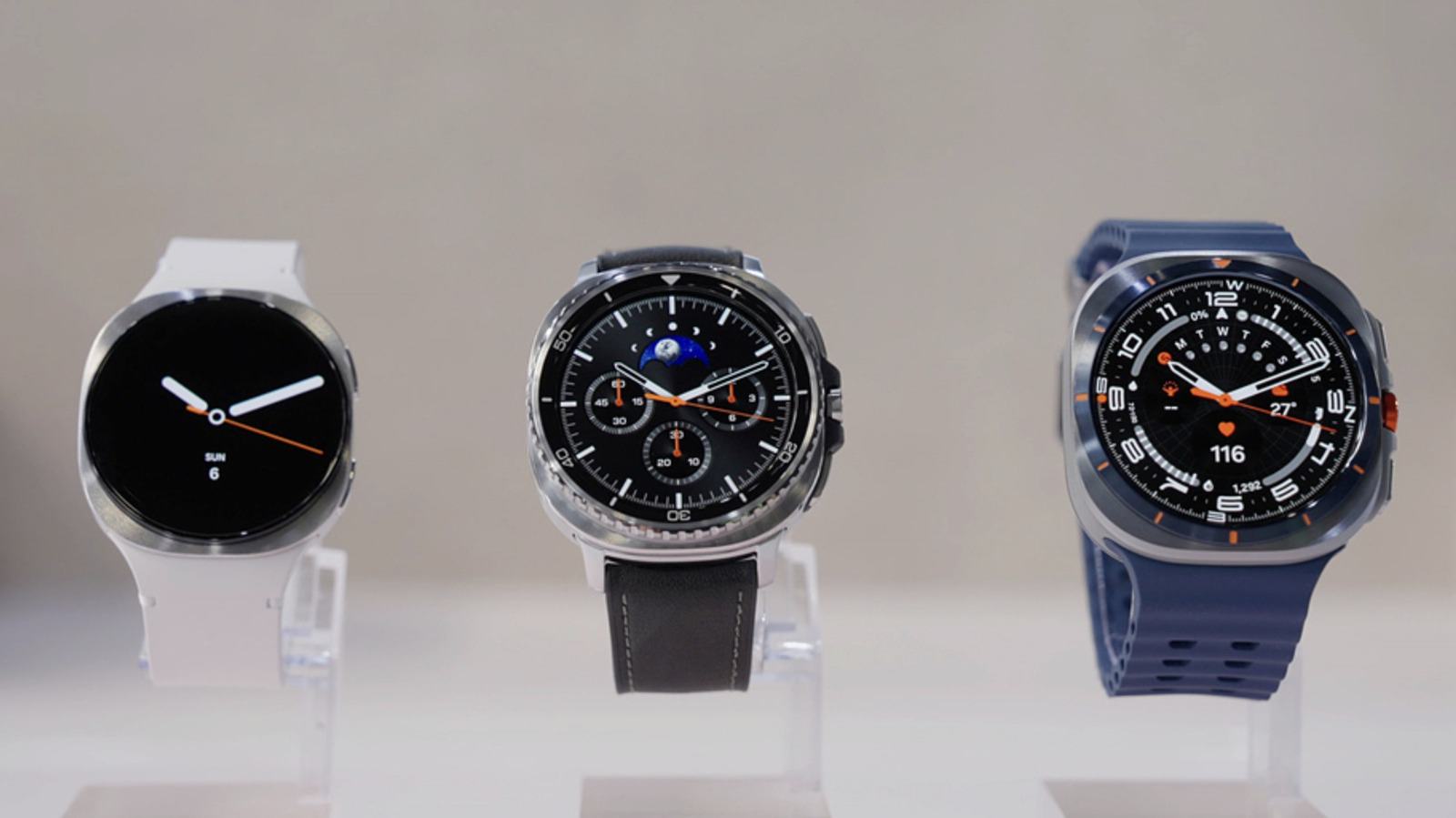
Understanding the Integration of Google Wallet with Galaxy Watch
Google Wallet's integration with the Samsung Galaxy Watch marks a significant step forward in the evolution of wearable technology, particularly in the realm of contactless payments. This integration allows users to make purchases directly from their wrists, effectively bypassing the need to carry physical cash or cards. As mobile payments become more prevalent, this feature taps into the growing consumer preference for digital wallets.
According to Engadget, the tap-to-pay feature of Google Wallet is currently available in select regions, including the United States. For users outside these areas, checking the availability of this feature on Google Wallet’s help page is advisable. Importantly, this functionality is limited to Galaxy Watch models running Wear OS 2.0 or later. This requirement excludes older versions such as the Galaxy Watch 1, 2, and 3, which may prompt users with outdated models to consider upgrading.
Compared to: The Apple Watch
When comparing this feature with its closest competitor, the Apple Watch, several distinctions emerge. Apple Pay has been integrated into Apple Watches since 2015, and it is available in more countries compared to Google Wallet. Apple Pay supports over 60 countries as opposed to Google Wallet's more limited regional availability. Pricing for the latest Apple Watch Series 8 starts at approximately €449, while the Samsung Galaxy Watch 5 starts at around €299, making the latter a more cost-effective option for those looking to access wearable payment features.
Requirements for Using Google Wallet on Samsung Wearables
To use Google Wallet on your Galaxy Watch, several prerequisites must be met. Engadget specifies that your watch must operate on Wear OS 2.0 or later. Fortunately, if you own a Galaxy Watch 4 or a newer model, you are equipped to utilize this feature. If not, and if contactless payment is a priority, an upgrade might be necessary.
Additionally, the availability of Google Wallet in your region is crucial. While it is confirmed to work in the U.S., users in other countries should verify regional support through Google's resources. It’s worth noting that the adoption rate of digital wallets can vary significantly based on regional market maturity and consumer habits.
Step-by-Step Guide to Setting Up Google Wallet on Your Galaxy Watch
Setting up Google Wallet on your Galaxy Watch is a straightforward process. Here’s a detailed step-by-step guide based on Engadget’s instructions:
1. Install Google Wallet: On your Galaxy Watch, swipe up to access the apps drawer. Navigate to the Play Store and search for Google Wallet. Proceed to install the app. 2. Set Up a Lock Screen: If your device does not have a lock screen, you will be prompted to create one. You can opt for a Pattern or PIN lock. For convenience, ensure you check the option "Unlock without tap after PIN entered." 3. Sync with Your Phone: It is essential to sync your Galaxy Watch with your linked Android phone to ensure the Wallet app functions correctly across devices. 4. Download Wallet on Your Phone: On your linked Android device, download Google Wallet from the Play Store if it’s not already installed. 5. Check Compatibility: Swipe down on your watch, access Settings, and tap “About watch” to verify your Wear OS version.
This methodical approach is designed to ease the transition to using Google Wallet on your Galaxy Watch, optimizing the user experience.
How to Add Payment Methods for Seamless Transactions
Once Google Wallet is installed, adding payment methods is essential for seamless transactions. Engadget provides a straightforward process:
1. Access the Wallet App: On your Galaxy Watch, tap the “+” tile to begin the process of adding a payment card. 2. Choose Your Card: Open the Wallet app on your linked phone to select from saved cards or add a new one. 3. Enter Card Details: For new cards, you can either scan the card or manually enter the details. 4. Verify with Your Bank: Google Wallet will interact with your bank to confirm the card's eligibility for Tap to Pay. Note that not all banks and cards support this feature, which can vary by region. 5. Default Card Selection: The first card added becomes the default payment method. You can change this by selecting another card and choosing “Make default.”
This streamlined process ensures that users can quickly set up their payment methods, paving the way for efficient transactions directly from their wrist.
Using Tap to Pay: What You Need to Know
The Tap to Pay feature is integral to maximizing the utility of Google Wallet on the Galaxy Watch. Here are key considerations from Engadget:
- Unlocking Requirement: It’s necessary to unlock your Galaxy Watch before making a payment. Open the Google Wallet app and position your watch near a card reader.
- Payment Confirmation: Successful transactions are indicated by a vibration, a sound, and a blue checkmark appearing on the screen.
- Non-default Card Payments: If using a different card than your default, swipe up on the watch to select the desired card prior to payment.
Additionally, Google Wallet integrates with payment systems like Suica and PASMO in Japan, showcasing its adaptability. However, this feature is restricted to models bought in Japan that include Sony's FeliCa technology.
Real Daily-Use Scenario
Imagine you’re out for a morning jog and decide to stop for a coffee. With your Galaxy Watch, you can quickly pay at the counter without needing to carry your phone or wallet. After confirming your choice, you unlock the watch, open Google Wallet, and hold it near the payment terminal. A quick vibration and a checkmark confirm your purchase, allowing you to enjoy your coffee without any hassle. This convenience epitomizes the advantage of having Google Wallet on your wrist, seamlessly integrating into daily activities.
What's Still Unclear
Despite the available information, several aspects remain ambiguous. The exact timeline for Google Wallet's expansion beyond the U.S. is not specified, leaving international users in anticipation. Furthermore, while the integration appears promising, comprehensive data on user satisfaction and adoption rates are not yet available. Given the intense competition in the wearable market, particularly from the Apple Watch, it will be intriguing to observe how consumers respond to Samsung's offerings.
What This Means for You
For existing Galaxy Watch users, particularly those using the Galaxy Watch 4 or newer, the integration of Google Wallet provides an added layer of convenience in managing daily transactions. It represents an opportunity to streamline payment processes and embrace the shift towards digital wallets. However, widespread adoption is contingent on the expansion of regional availability and support from financial institutions.
With Apple Watch setting a high standard, Samsung must continue to innovate and ensure robust support for Google Wallet to capture a larger share of the market. For consumers, this competition is beneficial, potentially leading to more features and better service offerings.
Closing Take
Google Wallet’s integration with the Galaxy Watch is a notable development in the wearable technology landscape. While promising, its success will depend largely on regional availability and user adoption. As the technology matures and expands, it holds the potential to redefine how we approach daily financial transactions, making them more integrated and seamless than ever before. For now, the users' experience and feedback will be crucial in shaping the future trajectory of contactless payments in the wearable domain.
Sources cross-referenced
This story was synthesised from reporting by 4 outlets:
1. Engadget 2. Engadget 3. 9to5Google 4. 9to5Google
Cases, chargers and AirPods alternatives the editors actually use.
Shop mobile gear →Discuss this story
Got a take, a correction, or a follow-up tip? Reply where you read — we read everything.
Found an error? File a correction at /corrections. Substantive corrections are logged publicly.
One short email. The most important Mobile news, fact-checked, no fluff. Free, unsubscribe anytime.
More from Mobile

Apple's 'Deep Discounts': US Inventory Flush, Not European Bargains
Byte-Pulse examines Apple's recent US sales, revealing that 'deep discounts' on popular devices like the iPhone 17 Pro and M3 iPad Air are less about consumer savings and more about clearing stock ahead of new launches. We critically assess whether these offers translate to real value for European buyers.
Android Auto vs. CarPlay: Open vs. Controlled Infotainment Ecosystems
A deep dive into Android Auto's flexibility versus Apple CarPlay's curated experience, impacting user choice and OEM strategy
Google's Grip on Android App Distribution Under Fire
US District Judge James Donato gives Google one week to fix its deliberately obscured third-party app store access, highlighting Google's resistance to fair competition

Android 17 QPR2 Beta 3: Pixel Security and Controls Get a Boost
Byte-Pulse examines Android 17 QPR2 Beta 3, focusing on new UI elements, security updates, and user controls for Pixel devices.
The Byte-Pulse Newsroom is the editorial system that produces Byte-Pulse's daily tech news coverage. Each story is cross-referenced across 3+ independent outlets, drafted with AI assistance by the newsroom system (Drafter → Editor → Fact-Checker → Polisher), and reviewed by Serhat Er, Editor-in-Chief, before publication. We disclose AI augmentation openly. Editorial accountability stays with the named editor on every article. Tips: editorial@byte-pulse.net.
Don’t miss these
Proton Mail vs Gmail: Which Email Service Fits Your Digital Life?
Unsure about Proton Mail vs Gmail? We break down security, features, pricing, and daily use so you can confidently pick the email service that aligns with your priorities.
Perplexity Pro vs ChatGPT Plus: Which AI Assistant Fits Your Workflow?
This guide lays out the strengths and approaches of Perplexity Pro and ChatGPT Plus, helping you identify which AI assistant aligns with your specific needs.

Pokémon TCG Movie Signals Strategic Media Pivot for The Pokémon Company
A new Pokémon movie focused on the TCG is coming in 2027, marking a strategic pivot for the franchise as it navigates massive global fan engagement and logistical challenges.

Apple's AI Pivot: Vision Pro Content Cut, Siri Rebuilt Amid Layoffs
Apple's latest layoffs signal a strategic pivot, dialing back high-cost Vision Pro content while re-tooling Siri for the AI era. What's next for Apple?

D23 2026: Disney's Content Deluge Sparks Questions About Strategy
Byte-Pulse cuts through D23 hype: We dissect Disney's ambitious content slate, from Simpsons: Hit & Run to Ahsoka season 2, and question the real-world implications and European market strategy.

eBay's $55.7M Cyberstalking Settlement: A Corporate Culture of Coercion Exposed
Byte-Pulse investigates the eBay cyberstalking case, revealing a disturbing harassment campaign, executive involvement, and the broader implications for corporate ethics.