Ugreen Maxidok 10-in-1: A Sleek Thunderbolt 5 Dock with Design Flaws
Ugreen's dock impresses with speed but misses some marks for USB-C fans.

Ugreen Maxidok 10-in-1: A Sleek Thunderbolt 5 Dock with Design Flaws
The modern workspace constantly demands more from our devices, and docking stations have emerged as a crucial tool for professionals seeking to streamline their setups. Enter Ugreen's Maxidok 10-in-1, a docking station that embraces the cutting-edge Thunderbolt 5 standard, promising blazing-fast data transfer speeds and a sleek design without overwhelming your desk space. But does it deliver on all fronts?
Thunderbolt 5: Speed Meets Connectivity
The Ugreen Maxidok 10-in-1 distinguishes itself with Thunderbolt 5, offering data transfer speeds that reach a remarkable 120 Gbit/s. This makes it an attractive option for users dealing with large video files or extensive data transfers. The efficiency of Thunderbolt 5 ensures that data-heavy tasks, like editing 4K video files or transferring large datasets, become less time-consuming, which can significantly enhance productivity.
For connectivity, the Maxidok provides a Gigabit Ethernet port and a DisplayPort, supporting high-refresh-rate monitors, which is beneficial for gamers and creative professionals alike. However, its absence of an HDMI port might be a dealbreaker for some. As HDMI remains a ubiquitous standard, especially in consumer electronics, users who rely on HDMI displays will need to invest in an adapter, adding an extra step and cost to their setup.
Design Choices: A Mixed Bag
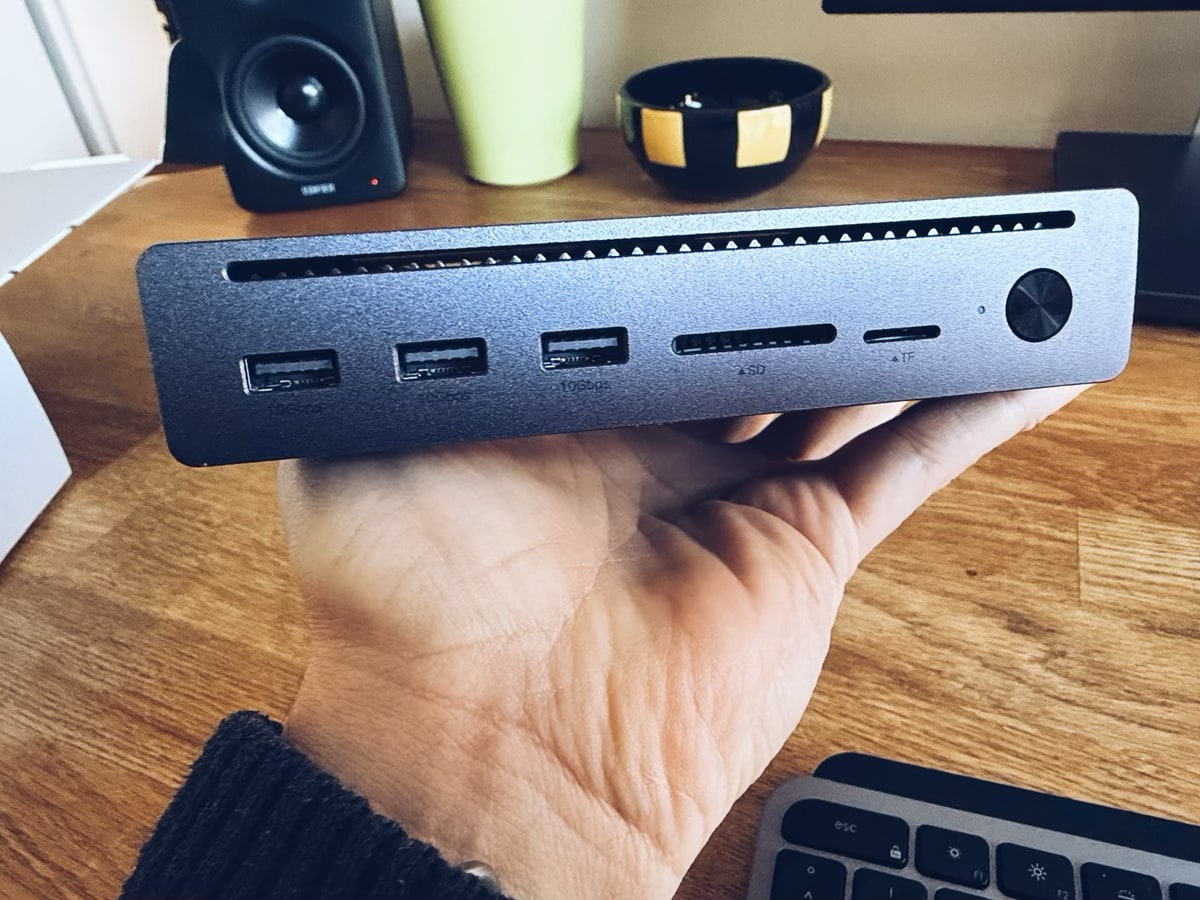
Ugreen's design approach with the Maxidok 10-in-1 is both praised and critiqued. The dock boasts a sturdy metal construction and a fabric cable that not only adds to its aesthetic appeal but also enhances durability. Yet, some design decisions could leave users scratching their heads. The positioning of USB-C ports at the back and USB-A ports at the front is particularly perplexing. In a world where USB-C is increasingly becoming the standard due to its versatility and speed, its placement at the back could be seen as inconvenient for users who frequently swap peripherals.
Further complicating matters, the dock requires an external power supply to deliver up to 100 watts for charging laptops. While this is beneficial for keeping laptops powered and ready, the need for an additional power brick could contribute to desk clutter—something the dock is supposed to reduce. Yet, its compact design is still an advantage over some of its bulkier counterparts, making it easier to integrate into tight workspaces.
Understanding Ugreen's Broader Lineup
Ugreen's Maxidok series doesn't stop at the 10-in-1 model. For those seeking even more functionality, the company's 17-in-1 variant might be worth a look. This more advanced model not only increases the power delivery capacity to 140 watts but also includes an M.2 NVMe SSD slot, providing additional storage solutions directly within the dock. Such features cater to power users who need robust capabilities from their docking station. However, these additional features come with increased size and possibly higher costs, which potential buyers must weigh against their specific needs.
Context: The Growing Importance of Docking Stations
Docking stations have become integral to today's hybrid work environments. With many professionals splitting time between home and office, the ability to quickly connect a laptop to a full suite of peripherals is invaluable. In the European market, where workspace efficiency is highly valued, products like the Maxidok that promise to reduce clutter while increasing functionality are particularly appealing. The EU's push towards USB-C as a common charging standard further underscores the importance of compatible and forward-thinking designs.
What This Means for You
If you're in the market for a docking solution, the Ugreen Maxidok 10-in-1 offers a compelling mix of performance and design. Its Thunderbolt 5 capabilities make it an excellent choice for anyone working with large files or high-speed data transfer needs. However, if your setup relies heavily on HDMI or USB-C accessibility, you may need to consider additional accessories or look at alternative models. For users prioritizing a clean, efficient workspace, the Maxidok's compact design might just hit the sweet spot.
What's Still Unclear
As with any piece of technology, there are lingering questions about the Maxidok 10-in-1. The rationale behind placing USB-C ports at the back is unclear, especially given the increasing prevalence of USB-C devices. Was this a cost-saving measure, or a decision made to preserve the dock's compact profile? Furthermore, the omission of an HDMI port leaves users pondering whether this was an oversight or a strategic decision to push users towards a more future-proof connectivity standard.
- USB-C Placement: Why are USB-C ports in the back?
- No HDMI: Cost-saving move or oversight?
- Consumer Reaction: How will users take to these design choices?
Editorial Take
Ugreen's Maxidok 10-in-1 represents a significant step forward in docking technology, leveraging the power of Thunderbolt 5 to meet the demands of modern users. However, the company's design choices might hinder its potential appeal. While the market continues to trend towards USB-C, ensuring ease of access is crucial. As we move forward, the challenge for manufacturers will be balancing innovative features with practical design, ensuring that products not only perform well but also fit seamlessly into the everyday lives of consumers. The Maxidok 10-in-1 succeeds in many areas, but future iterations could benefit from a closer look at user-centric design.
Discuss this story
Got a take, a correction, or a follow-up tip? Reply where you read — we read everything.
Found an error? File a correction at /corrections. Substantive corrections are logged publicly.
One short email. The most important Hardware news, fact-checked, no fluff. Free, unsubscribe anytime.
More from Hardware
AMD Ryzen 7 9800X3D vs Intel Core Ultra 7 265K: Which Chip Drives Your Next Build?
Deciding between AMD's V-Cache prowess and Intel's new Ultra architecture? This guide cuts through the noise to show you what each CPU truly offers for your money.
AMD Ryzen 9 9950X3D vs Intel Core Ultra 9 285K: Next-Gen Desktop Showdown
A deep dive into the expected strengths of AMD's Zen 5 X3D and Intel's next-gen Core Ultra K-series, laying out the trade-offs for serious buyers.
AMD RX 9080 XT vs. NVIDIA RTX 5080: Which High-End GPU Fits Your Build?
Navigating the high-end GPU market means weighing raw rasterization, ray tracing, upscaling tech, and ecosystem against your budget and priorities.
RTX 5090 vs RTX 5080: Decoding the Next-Gen Performance Divide
Considering NVIDIA's upcoming RTX 5090 and RTX 5080? We break down the rumored specs, anticipated performance, and real-world trade-offs so you can make an informed choice.
The Byte-Pulse Newsroom is the editorial system that produces Byte-Pulse's daily tech news coverage. Each story is cross-referenced across 3+ independent outlets, drafted with AI assistance by the newsroom system (Drafter → Editor → Fact-Checker → Polisher), and reviewed by Serhat Er, Editor-in-Chief, before publication. We disclose AI augmentation openly. Editorial accountability stays with the named editor on every article. Tips: editorial@byte-pulse.net.
Don’t miss these
Asus ROG Phone 9 vs Sony Xperia 1 VII: Which Niche Flagship Earns Your Money?
Deciding between the gaming-focused ROG Phone 9 and the creator-centric Xperia 1 VII? This guide breaks down every spec to help you choose.
Proton VPN vs NordVPN: Which One Earns Your Subscription?
A deep dive into Proton VPN and NordVPN, comparing their privacy, performance, features, and value, helping you make an informed decision.
Perplexity Pro vs ChatGPT Plus: Which AI Assistant Fits Your Workflow?
This guide lays out the strengths and approaches of Perplexity Pro and ChatGPT Plus, helping you identify which AI assistant aligns with your specific needs.

Pokémon TCG Movie Signals Strategic Media Pivot for The Pokémon Company
A new Pokémon movie focused on the TCG is coming in 2027, marking a strategic pivot for the franchise as it navigates massive global fan engagement and logistical challenges.
Honor Magic 8 Pro vs Samsung Galaxy S26 Ultra: Which Future Flagship Fits Your Wallet and Workflow?
Deciding between the anticipated Honor Magic 8 Pro and Samsung Galaxy S26 Ultra? Our deep dive into expected specs and features provides the fair comparison you need.
Notion vs Obsidian: Which Knowledge Hub Fits Your Workflow?
Deciding between Notion and Obsidian? We break down the core differences in philosophy, data ownership, collaboration, and extensibility to help you choose.