Oda Revives Mac Document Management with Minimalist Design
New app Oda offers a streamlined approach to document management on macOS.

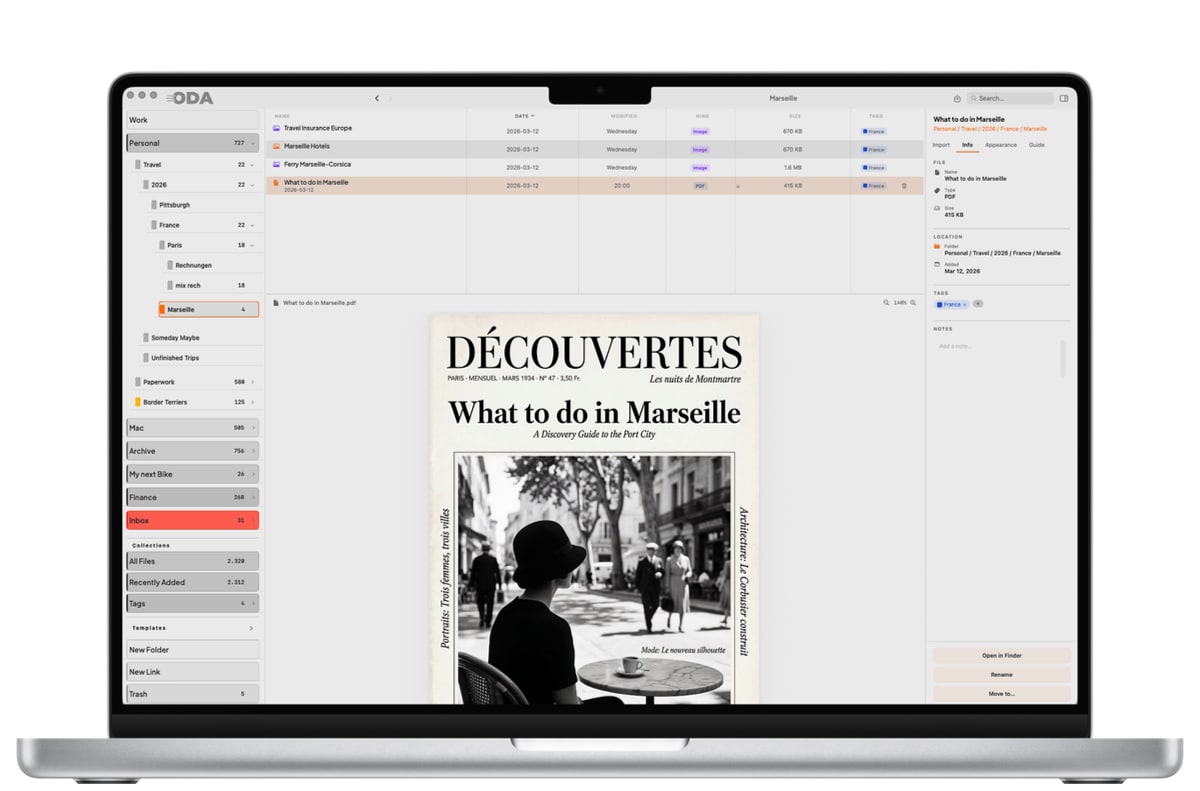
Oda Revives Mac Document Management with Minimalist Design
Managing documents on a Mac? Always a pain, right? For years, many of us have wrestled with comprehensive solutions like DEVONthink. Sure, it's packed with features. But let's be honest, it's also overwhelmingly complex. If you're tired of software that feels like overkill for organizing everyday stuff—bills, contracts, you know the drill—a new app called Oda might just be your answer.
Streamlined Simplicity
Oda tackles document management by simply stripping away the fluff. Seriously. You'll find a mere five options in its settings menu, all on one page. No tabs. No nested menus. This design is refreshingly straightforward, ideal for those who value efficiency over an abundance of seldom-used features. A particularly handy feature? A single-click backup button that secures your documents, folders, and all their metadata. This isn't just a design choice; it's a philosophy. The developers believe software gets better not by adding more, but by knowing exactly what to leave out.
Think of the app as a natural extension of your Mac's Finder. Anything you do in Oda? It shows up immediately in your Mac's folder structure. And if you ever ditch the app, your organized files stay right where they are on your hard drive. No vendor lock-in. For day-to-day tasks, Oda gives you a right-click context menu on folders with twelve functions. You can open in Finder, set import folders, apply one of 14 colors, or even save templates. Pretty slick, actually.
Real-World Scenario
Imagine this: You're a freelance graphic designer juggling multiple projects. You have contracts, invoices, and drafts for each client. With Oda, managing these documents becomes less of a chore. You can easily color-code files by client or project urgency using one of the 14 available colors. Need to ensure your latest contract is backed up before heading into a meeting? Just hit that one-click backup button. It's reliable, and you don’t have to worry about losing your work. When you’re on the go, quickly access these documents on your iPhone or iPad—thanks to the companion apps—without fumbling through a maze of features.
Companion Apps and Pricing
Beyond macOS, Oda offers companion apps for iPhone and iPad. These let you access your data over local Wi-Fi. That's a real win for power users who need seamless access across their devices. Whether you're at home or a cafe, your documents are readily available, making it easier to stay productive. Price-wise, it's a one-time fee of €22.90. No subscriptions. Just pay once and you're done. This is a sweet deal when you consider that many apps these days lean heavily on subscription models, which can add up quickly over time.
Context: Minimalism in Software Design
Oda's minimalist design isn't happening in a vacuum. It's part of a bigger trend, where developers are finally focusing on intuitive, user-friendly interfaces. It's a stark contrast to those feature-rich but often clunky apps like DEVONthink, which can feel pretty daunting for newcomers. Especially in Europe, where GDPR compliance is a big deal, simplifying document management without sacrificing core functionality can be a huge plus, whether you're using it personally or professionally.
What This Means for You
Been battling complex document management systems? Oda could be the relief you've been looking for. Its straightforward design means less time wrestling with software, more time getting your actual work done. And that one-time fee? No recurring costs, which is always a bonus for anyone watching their budget. Imagine saving not just money but also the mental bandwidth previously spent navigating labyrinthine menus.
What's Still Unclear
Oda looks promising, but some questions linger. What about long-term support and updates? The tech world evolves rapidly, and software that doesn't adapt can quickly become obsolete. Will its minimalist approach eventually limit future enhancements, or will it evolve with user feedback? Also, how well does it really stack up against more robust competitors when you're managing massive amounts of documents? These are important considerations, especially if you're dealing with a high volume of data and need advanced features like AI-powered search capabilities or integration with third-party apps.
Why This Matters
Oda really shakes up document management on macOS by making it simple again. Its minimalist design philosophy taps into a growing demand for user-friendly software that doesn't sacrifice performance for ease. As more users look for straightforward solutions, Oda is setting a new bar for balancing functionality with pure simplicity. If you're tired of software bogged down by unnecessary features, Oda's approach might just be the fresh perspective you need. It's a reminder that sometimes, less truly is more, and in the cluttered world of digital tools, clarity is king.
Discuss this story
Got a take, a correction, or a follow-up tip? Reply where you read — we read everything.
Found an error? File a correction at /corrections. Substantive corrections are logged publicly.
One short email. The most important Software news, fact-checked, no fluff. Free, unsubscribe anytime.
More from Software
Proton VPN vs NordVPN: Which One Earns Your Subscription?
A deep dive into Proton VPN and NordVPN, comparing their privacy, performance, features, and value, helping you make an informed decision.
Notion vs Obsidian: Which Knowledge Hub Fits Your Workflow?
Deciding between Notion and Obsidian? We break down the core differences in philosophy, data ownership, collaboration, and extensibility to help you choose.
Proton Mail vs Gmail: Which Email Service Fits Your Digital Life?
Unsure about Proton Mail vs Gmail? We break down security, features, pricing, and daily use so you can confidently pick the email service that aligns with your priorities.

Apple's Beta Updates: Enhancements, Challenges, and Future Outlook
Exploring the latest beta updates from Apple for tvOS, macOS, and visionOS, including key features and performance issues.
The Byte-Pulse Newsroom is the editorial system that produces Byte-Pulse's daily tech news coverage. Each story is cross-referenced across 3+ independent outlets, drafted with AI assistance by the newsroom system (Drafter → Editor → Fact-Checker → Polisher), and reviewed by Serhat Er, Editor-in-Chief, before publication. We disclose AI augmentation openly. Editorial accountability stays with the named editor on every article. Tips: editorial@byte-pulse.net.
Don’t miss these
Asus ROG Phone 9 vs Sony Xperia 1 VII: Which Niche Flagship Earns Your Money?
Deciding between the gaming-focused ROG Phone 9 and the creator-centric Xperia 1 VII? This guide breaks down every spec to help you choose.
Perplexity Pro vs ChatGPT Plus: Which AI Assistant Fits Your Workflow?
This guide lays out the strengths and approaches of Perplexity Pro and ChatGPT Plus, helping you identify which AI assistant aligns with your specific needs.

Pokémon TCG Movie Signals Strategic Media Pivot for The Pokémon Company
A new Pokémon movie focused on the TCG is coming in 2027, marking a strategic pivot for the franchise as it navigates massive global fan engagement and logistical challenges.

Apple's AI Pivot: Vision Pro Content Cut, Siri Rebuilt Amid Layoffs
Apple's latest layoffs signal a strategic pivot, dialing back high-cost Vision Pro content while re-tooling Siri for the AI era. What's next for Apple?
Honor Magic 8 Pro vs Samsung Galaxy S26 Ultra: Which Future Flagship Fits Your Wallet and Workflow?
Deciding between the anticipated Honor Magic 8 Pro and Samsung Galaxy S26 Ultra? Our deep dive into expected specs and features provides the fair comparison you need.
Claude Pro vs Google Gemini Advanced: Which AI Assistant Deserves Your Subscription?
This definitive guide cuts through the marketing to give you a fair, balanced breakdown of Claude Pro and Gemini Advanced, letting you decide which AI best fits your workflow.