Super Productivity: Open-Source Task Tool Prioritizes Privacy
Privacy-focused tool offers offline task tracking and time logging.

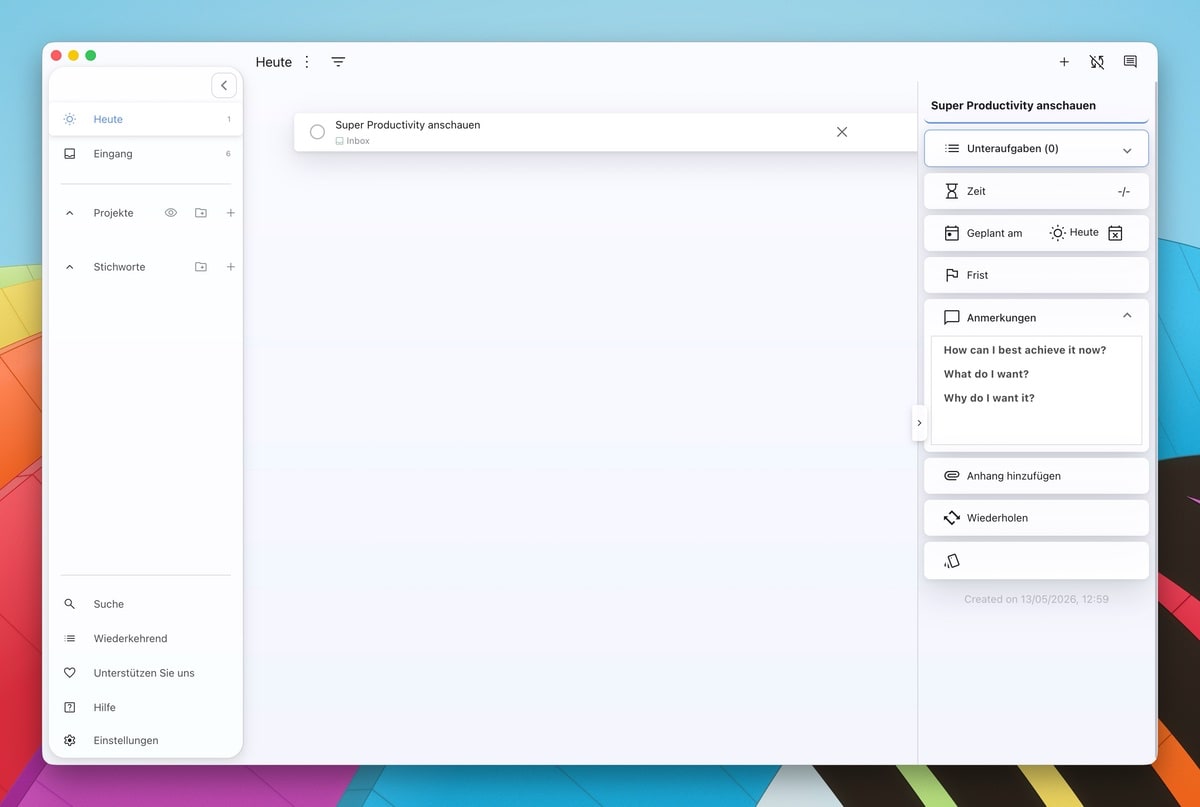
In a world dominated by subscription-based task management tools, Super Productivity stands out as a compelling open-source alternative for those who prioritize data privacy. Developed by Johannes Millan, this tool provides a comprehensive solution for organizing tasks without the need for an online account or data telemetry.
Super Productivity is completely open-source and free to use, designed to work primarily offline—ensuring that your data stays with you. Users have the option to synchronize their data across devices using WebDAV, Nextcloud, or Dropbox, keeping control firmly in their hands. Although the developer plans to introduce server capabilities in the future, this will likely incur a fee.
Features and Functionality
The application covers classic task management functions while offering advanced structures through subtasks, notes, and deadlines. It supports popular organizational methodologies like Kanban boards and the Eisenhower matrix. A key feature is its integrated time tracking, which can be activated with a single click or keyboard shortcut.
For freelancers, this means automated work reports and time logs, simplifying the billing process. To maintain focus, a Pomodoro timer is also included, complete with break notifications and a focus mode that minimizes distractions.
Developer Integration
For developers, Super Productivity integrates with Jira, GitHub, and GitLab, allowing direct import and synchronization of issues—reducing the need to switch between different tools constantly. It also supports CalDAV for calendar integration, helping users keep track of their daily schedules.
The app is designed for efficiency, with almost all functions controllable via keyboard shortcuts. Data can be exported in JSON or CSV formats, eliminating the risk of vendor lock-in. On GitHub, the project has garnered over 19,300 stars, highlighting its popularity and community support.
Context: European Perspective
In the European tech landscape, where privacy regulations like GDPR are stringent, Super Productivity's local data handling resonates well. Unlike many US-based alternatives, it aligns with the EU's focus on data privacy and user control.
What This Means for You
If you're concerned about data privacy and looking for a robust task management tool that operates offline, Super Productivity is worth considering. Its integration with developer platforms like GitHub and Jira makes it particularly appealing for tech professionals. Keep an eye on potential server functionalities which may introduce costs in the future.
What's Still Unclear
While the tool is comprehensive, the timeline for the introduction of server functionalities and associated costs remains unspecified. Additionally, the long-term support and updates for this open-source project depend on community engagement and developer commitment.
Why This Matters
"Super Productivity Revives Task Management with Privacy at Its Core" — In an era of increasing data privacy concerns, this tool offers a refreshing take on task management by keeping user data local and integrating with popular developer tools, making it a valuable asset for individuals and tech professionals alike.
Discuss this story
Got a take, a correction, or a follow-up tip? Reply where you read — we read everything.
Found an error? File a correction at /corrections. Substantive corrections are logged publicly.
One short email. The most important Software news, fact-checked, no fluff. Free, unsubscribe anytime.
More from Software
Proton VPN vs NordVPN: Which One Earns Your Subscription?
A deep dive into Proton VPN and NordVPN, comparing their privacy, performance, features, and value, helping you make an informed decision.
Notion vs Obsidian: Which Knowledge Hub Fits Your Workflow?
Deciding between Notion and Obsidian? We break down the core differences in philosophy, data ownership, collaboration, and extensibility to help you choose.
Proton Mail vs Gmail: Which Email Service Fits Your Digital Life?
Unsure about Proton Mail vs Gmail? We break down security, features, pricing, and daily use so you can confidently pick the email service that aligns with your priorities.

Apple's Beta Updates: Enhancements, Challenges, and Future Outlook
Exploring the latest beta updates from Apple for tvOS, macOS, and visionOS, including key features and performance issues.
The Byte-Pulse Newsroom is the editorial system that produces Byte-Pulse's daily tech news coverage. Each story is cross-referenced across 3+ independent outlets, drafted with AI assistance by the newsroom system (Drafter → Editor → Fact-Checker → Polisher), and reviewed by Serhat Er, Editor-in-Chief, before publication. We disclose AI augmentation openly. Editorial accountability stays with the named editor on every article. Tips: editorial@byte-pulse.net.
Don’t miss these
Honor Magic 8 Pro vs Samsung Galaxy S26 Ultra: Which Future Flagship Fits Your Wallet and Workflow?
Deciding between the anticipated Honor Magic 8 Pro and Samsung Galaxy S26 Ultra? Our deep dive into expected specs and features provides the fair comparison you need.
Perplexity Pro vs ChatGPT Plus: Which AI Assistant Fits Your Workflow?
This guide lays out the strengths and approaches of Perplexity Pro and ChatGPT Plus, helping you identify which AI assistant aligns with your specific needs.

Pokémon TCG Movie Signals Strategic Media Pivot for The Pokémon Company
A new Pokémon movie focused on the TCG is coming in 2027, marking a strategic pivot for the franchise as it navigates massive global fan engagement and logistical challenges.

Apple's AI Pivot: Vision Pro Content Cut, Siri Rebuilt Amid Layoffs
Apple's latest layoffs signal a strategic pivot, dialing back high-cost Vision Pro content while re-tooling Siri for the AI era. What's next for Apple?

D23 2026: Disney's Content Deluge Sparks Questions About Strategy
Byte-Pulse cuts through D23 hype: We dissect Disney's ambitious content slate, from Simpsons: Hit & Run to Ahsoka season 2, and question the real-world implications and European market strategy.
Xiaomi 16 Pro vs iPhone 18 Pro: Which Flagship Fits Your World?
Deciding between the Xiaomi 16 Pro and iPhone 18 Pro? We break down every spec and trade-off, so you can make the choice that's right for you.