WhatsApp Web Gets Calls: Meta's Cross-Platform Play Begins
After years of mobile-only limitations, WhatsApp brings encrypted audio and video calls to the browser, aiming for unified communication but facing real-world deployment questions.

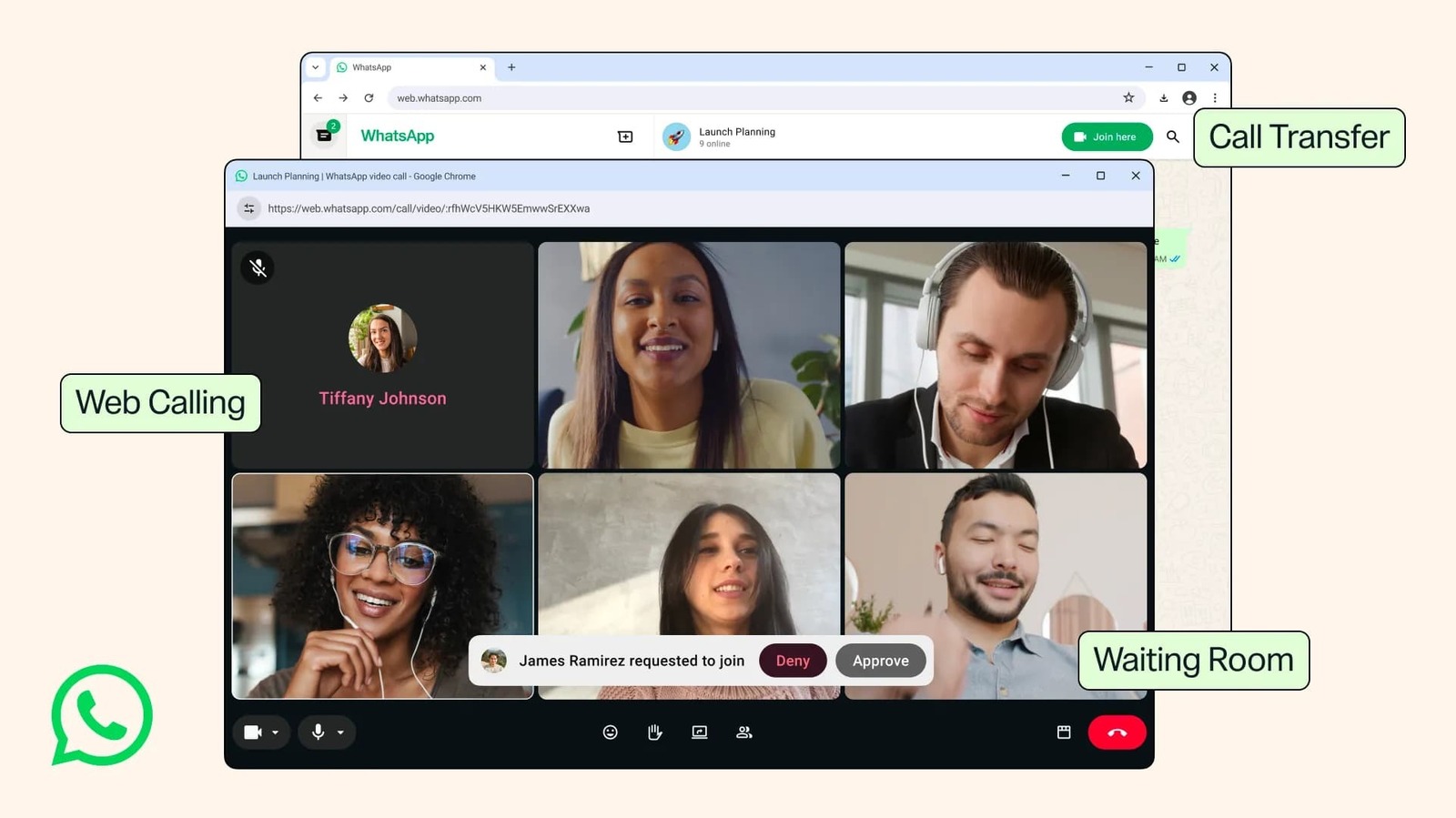
Anyone who has juggled devices during a call, or felt tethered to a smartphone for important conversations, will likely breathe a sigh of relief at Meta's news about WhatsApp’s web client. After what felt like an eternity, WhatsApp is finally rolling out support for one-on-one and group audio and video calls directly within the web browser. This isn't just a simple feature addition; it marks a significant, if long-overdue, strategic pivot for Meta, positioning WhatsApp more squarely as a unified communication tool, a market long dominated by established enterprise tools.
Why WhatsApp is bringing calls to your browser
For years, as TechCrunch rightly points out, WhatsApp calls have been exclusively a feature of its smartphone and native desktop applications. This created an unnecessary friction point for millions of users, particularly those who spend their working days in a browser environment. As 9to5Google articulates, this update means "whether you’re a college student on a shared computer, using a work laptop that doesn’t allow app downloads, or simply prefer your browser, you can jump on a call without leaving the browser you’re already on." This convenience factor is undeniable, yet I'm skeptical that this move is purely about user convenience; it feels more like a defensive play against competitors who have offered browser-based calling for years.
Engadget highlights the straightforward benefit of not needing to download an app, suggesting an easy user experience, but the underlying reality is more complex. This isn't novel technology; browser-based WebRTC calling has been standard for almost a decade. The delay from WhatsApp, a platform with billions of users, suggests either a significant technical hurdle in integrating their end-to-end encryption smoothly into a web environment, or a strategic reluctance to move beyond a mobile-first approach until market pressures became too great. I believe this is a pragmatic move to retain users who might otherwise gravitate towards more flexible platforms like Telegram or Signal, both of which have offered effective desktop and web calling for quite some time.
How end-to-end encryption works for web calls
Crucially, all sources confirm that these new web calls are, like their mobile counterparts, end-to-end encrypted. WhatsApp explicitly states, as quoted by 9to5Google, that "Your calls on the web are end-to-end encrypted — with no time limits and at no cost. It’s the same private experience you expect from WhatsApp." This is a critical detail, especially for a European audience, where data privacy isn't just a feature but a regulatory mandate. End-to-end encryption means that only the sender and intended recipient can read or listen to the communication, with no intermediaries, not even WhatsApp or Meta, having access to the content.
For web-based communication, implementing true end-to-end encryption can be a technical tightrope walk. Unlike a native application, a web client runs within a browser, which adds layers of complexity regarding key management and secure processing. While WhatsApp assures us of this encryption, independent security audits of this specific web implementation would provide much-needed transparency, especially given Meta's broader track record with data handling. As someone who has dealt with the intricacies of secure hardware and software deployments across the EU, I know that 'trust us' is never enough; verifiable security is paramount.
Beyond calls: what else is new on WhatsApp Web
Beyond calls, WhatsApp Web's capabilities are expanding, indicating a broader push for feature parity across all platform access points. New features include:
- Call Transfer: Users can now seamlessly transfer an ongoing call between devices—mobile, tablet, desktop, or web—without interruption. This is a genuinely useful feature for modern, multi-device workflows.
- Waiting Room for Group Calls: For hosts who enable the "Require approval to join" setting, participants joining via a link will enter a waiting room, giving the host control over who enters the conversation. TechCrunch notes this as a "key update for people who might host work calls on WhatsApp."
- QuickHD: WhatsApp has improved video streaming to deliver high-definition video almost immediately at the start of a call, addressing the common delay often experienced in the first few seconds.
- Noise Suppression: A new feature designed to filter out background noise, ensuring clearer voice transmission, even in busy environments. This can be managed in in-call settings.
- Screen Sharing and Reactions: These existing features from the native apps are now also available on the web, along with access to call history and favorite contacts.
These additions, particularly call transfer and the waiting room, suggest Meta is taking the functionality of WhatsApp Web more seriously, moving it beyond a mere companion app to a standalone communication hub. The integrated QuickHD and noise suppression also speak to a focus on call quality, which is essential for any platform aiming for widespread adoption.
The shift to unified communication across devices
This rollout isn't just about individual features; it's about a broader trend towards unified communication, where users expect seamless transitions and consistent experiences across all their devices. 9to5Mac notes that WhatsApp began adding support for calls to its web platform "earlier this year," with beta trials preceding this wider launch. This phased approach, while slow, underscores the complexity of ensuring stability and security across diverse web environments.
In the European context, the shift towards truly unified, secure communication platforms is particularly relevant. Businesses, especially small to medium-sized enterprises (SMEs), often seek cost-effective solutions that can span mobile and desktop without compromising security or regulatory compliance. While WhatsApp's consumer dominance is unchallenged, its entry into the enterprise space has always been hindered by its mobile-first design and the perception of a lack of strong admin controls. This web update, coupled with features like waiting rooms, inches it closer to, but still far from, the comprehensive offerings of Microsoft Teams or Zoom, which are deeply integrated into IT ecosystems and offer advanced management capabilities. From an operator's perspective, without strong IT management features and clear SLA guarantees, WhatsApp will remain a shadow IT solution for most European businesses, despite its new capabilities.
What this means for your daily messaging habits
For the average user, these updates mean greater flexibility and convenience. You can now start a video call on your phone while commuting and seamlessly transfer it to your desktop when you arrive at your office, continuing the conversation on a larger screen with less distraction. The waiting room feature, as TechCrunch highlights, will be particularly valuable for informal work meetings or larger family gatherings, giving hosts more control.
What remains unclear, however, is the actual performance across all major browsers, particularly less common ones or those with stricter privacy settings. Will the noise suppression be as effective in a bustling German Biergarten as it is in a quiet home office? While the gradual rollout, confirmed by all sources, promises eventual availability to "all users," the exact timeline for different regions and operating systems is unspecified. None of the sources examine the technical resource consumption of these web calls – a critical detail for users on older machines or with multiple browser tabs open. I anticipate that for many, a dedicated desktop app will still offer a more stable and less resource-intensive experience than a browser tab.
This move by WhatsApp is less about innovation and more about maturation and catching up. It solidifies WhatsApp's position as a truly cross-platform communication tool, making it more versatile for its massive user base. For Byte-Pulse readers, the critical takeaway isn't just the 'what,' but the 'why' and the 'how': the strategic imperative to close feature gaps, the ongoing commitment to end-to-end encryption in a complex web environment, and the persistent questions about its real-world utility beyond consumer use. This is a step towards a stronger WhatsApp, but it's a journey that still has many kilometers to cover, especially within Europe's challenging digital infrastructure and regulatory expectations.
Sources cross-referenced
This story was synthesised from reporting by 4 outlets:
1. Engadget 2. 9to5Mac 3. 9to5Google 4. TechCrunch
Editor-tracked discounts on the gadgets and gear worth buying right now.
See the deals →Discuss this story
Got a take, a correction, or a follow-up tip? Reply where you read — we read everything.
Found an error? File a correction at /corrections. Substantive corrections are logged publicly.
One short email. The most important Web & Apps news, fact-checked, no fluff. Free, unsubscribe anytime.
More from Web & Apps

D23 2026: Disney's Content Deluge Sparks Questions About Strategy
Byte-Pulse cuts through D23 hype: We dissect Disney's ambitious content slate, from Simpsons: Hit & Run to Ahsoka season 2, and question the real-world implications and European market strategy.

Spotify Relaunches AI Running Mode for iOS Premium Users
Spotify's new Running Mode for iOS uses AI to sync music with your stride, but its success hinges on AI quality and user input

Fox's $22 Billion Acquisition of Roku: A New Era in Streaming
Fox's acquisition of Roku for $22 billion marks a pivotal shift in streaming, merging content strength with platform reach.

Comparative Analysis of Global Social Media Bans for Children
As countries grapple with social media's impact on children, contrasting policies emerge. Australia and the UK lead with bans, while critics raise concerns.
The Byte-Pulse Newsroom is the editorial system that produces Byte-Pulse's daily tech news coverage. Each story is cross-referenced across 3+ independent outlets, drafted with AI assistance by the newsroom system (Drafter → Editor → Fact-Checker → Polisher), and reviewed by Serhat Er, Editor-in-Chief, before publication. We disclose AI augmentation openly. Editorial accountability stays with the named editor on every article. Tips: editorial@byte-pulse.net.
Don’t miss these
Steam Deck OLED vs MSI Claw 8 AI+: Which Handheld PC Earns Your Wallet?
Deciding between Valve's acclaimed handheld and MSI's latest Intel-powered challenger? We break down the specs, performance, and experience to help you choose your ideal portable gaming machine.
Apple M5 Pro vs. Apple M4 Pro: Projecting the Next Generation of Apple Silicon
We project the likely advancements of the unannounced M4 Pro and M5 Pro chips, offering a balanced, speculative look at future performance and efficiency.
Asus ROG Phone 9 vs Sony Xperia 1 VII: Which Niche Flagship Earns Your Money?
Deciding between the gaming-focused ROG Phone 9 and the creator-centric Xperia 1 VII? This guide breaks down every spec to help you choose.
PlayStation 5 Pro vs Nintendo Switch 2: Powerhouse or Portable Prowess?
Don't buy until you read this. We cut through the hype to lay out the real trade-offs between Sony's next powerhouse and Nintendo's anticipated hybrid.
AMD Ryzen 7 9800X3D vs Intel Core Ultra 7 265K: Which Chip Drives Your Next Build?
Deciding between AMD's V-Cache prowess and Intel's new Ultra architecture? This guide cuts through the noise to show you what each CPU truly offers for your money.
Honor Magic 8 Pro vs Samsung Galaxy S26 Ultra: Which Future Flagship Fits Your Wallet and Workflow?
Deciding between the anticipated Honor Magic 8 Pro and Samsung Galaxy S26 Ultra? Our deep dive into expected specs and features provides the fair comparison you need.