FileFluss 1.2 Simplifies Cloud Management with User-Centric Updates
New update focuses on making cloud integration, everyday use, actually *easy*.

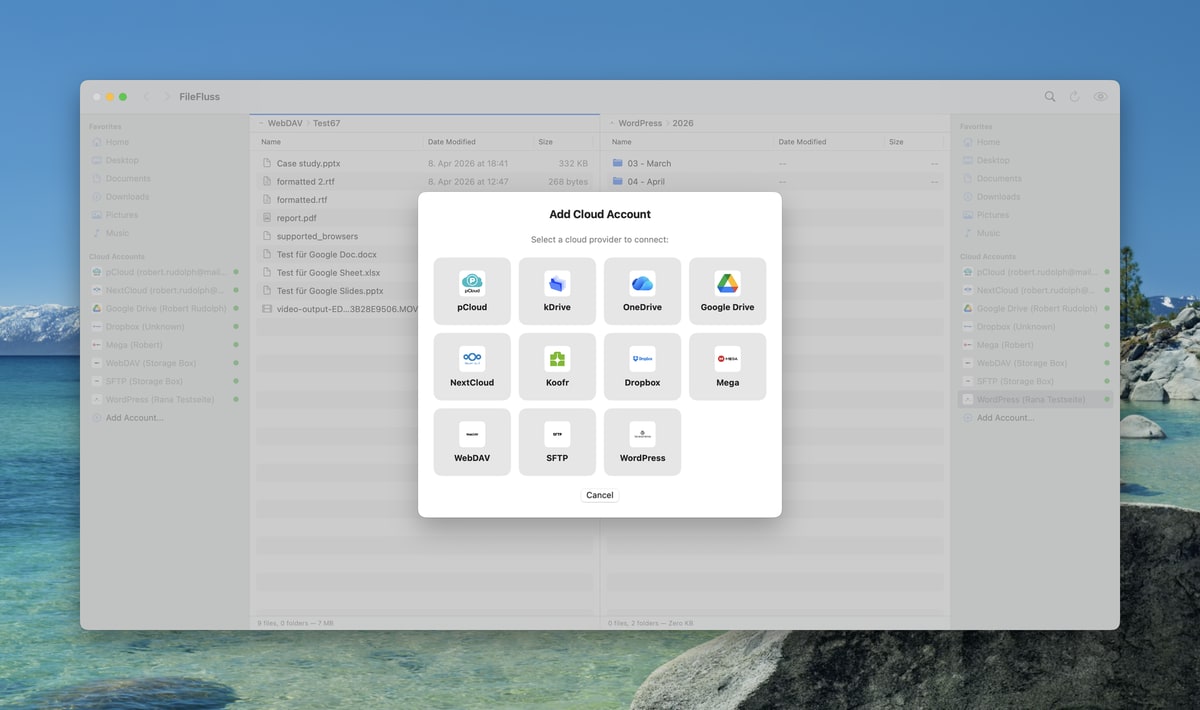
Title: FileFluss 1.2 Drops: Cloud Management Gets a Major Human Touch
---
FileFluss has just released version 1.2, a significant update for anyone immersed in the world of cloud storage. This update revolves around enhancing usability, speeding up workflows, and integrating more seamlessly with your existing cloud setup.
Enhanced Cloud Integration
Cloud services have become ubiquitous in our daily lives. From personal photos to critical business documents, everything is stored somewhere in the cloud. FileFluss 1.2 acknowledges this reality, tackling the need for smarter cloud management head-on. With this update, users can now see their cloud storage usage — what's used and what's available — directly in the status bar or as a sidebar tooltip. This feature is particularly useful for users juggling multiple accounts, as it provides a quick snapshot of storage status without needing to dive into settings.
Further enhancements to the sidebar allow users to resize them independently or switch to an icon-only view. This flexibility is a boon for those managing numerous cloud accounts, as it offers more space for file lists and reduces clutter. For instance, if you're a project manager handling files across Google Drive, Dropbox, and OneDrive, you can now streamline your interface to focus on the files that matter.
Improved User Experience
FileFluss 1.2 has put a lot of effort into making the app feel more intuitive and familiar. Adjusting line sizes in lists is a breeze — simply hit the view menu or use Command and Plus/Minus. This small tweak can make a big difference, especially when dealing with extensive file lists across different cloud services.
A notable addition is the new context menu option for automatic column width adjustments, applicable to both local and cloud directories. This ensures that you always have the right amount of information visible, without the frustration of manually resizing columns.
Drag-and-drop functionality has been refined too. Adding folders to favorites is now a straightforward process. As you drag, FileFluss 1.2 shows exactly where the entry will land, making organization tidier and faster — a feature likely to be appreciated by users juggling diverse projects.
Streamlined Account Management
Account management within FileFluss 1.2 has seen significant improvements, offering a much smoother experience. Users can now handle cloud credentials directly within the app settings, eliminating the need to delete and recreate accounts due to password changes. This enhancement is particularly valuable for busy professionals who frequently update their credentials.
Removing accounts from the sidebar context menu is now a straightforward task, and the new account dialog adapts to your screen size. It won’t freeze up if you decide to cancel a browser login mid-process, which is a relief for those who often multitask.
Technical Enhancements
For the technically inclined, FileFluss 1.2 brings several under-the-hood improvements. Amazon S3 users can now specify a subfolder or bucket when setting up an account, allowing your view to start precisely where you want it. This feature is particularly beneficial for businesses that manage vast amounts of data spread across different buckets.
SFTP connections have also been improved, fixing previous issues related to folder contents under specific timestamps or SELinux listings. These enhancements ensure a more reliable and consistent experience when accessing and managing cloud files.
Visually, FileFluss 1.2 has received a facelift. It features fourteen new cloud provider logos and a dark app icon that integrates seamlessly with macOS, providing a cohesive user experience. Moreover, the app is now lighter on your system, utilizing less memory in the background — a crucial aspect for users running multiple applications simultaneously.
Existing accounts will be seamlessly carried over from version 1.1.1, ensuring a smooth transition without any data loss or need for reconfiguration.
Context: European Tech Landscape
In the European tech landscape, FileFluss stands out as a robust open-source alternative to larger, often US-based, file managers. Europeans, who are generally more cautious about data privacy, appreciate FileFluss's focus on local control and privacy. As an open-source application, it provides users with greater transparency and control over their data, aligning with the stringent data protection standards that are prevalent across Europe.
What This Means for You
So, what does this mean for you? If you're wrestling with multiple cloud accounts, FileFluss 1.2 offers enhanced control and efficiency, potentially saving you significant time and reducing frustration. Power users, in particular, will find the streamlined interface and robust management features a relief when dealing with a deluge of data.
Imagine being a freelance graphic designer who needs to access assets stored across various platforms like Adobe Creative Cloud, Google Drive, and Dropbox. FileFluss 1.2 simplifies this process, offering a unified interface that reduces the need to switch between different applications and interfaces.
What's Still Unclear
While FileFluss 1.2 is a solid update, some aspects remain unclear. Users are likely wondering about future integrations — will we see support for more cloud services or broader platform compatibility? What's the timeline for these developments? These questions linger as users look forward to the roadmap for future updates and features. Keeping an eye on how FileFluss evolves will be crucial for those who have integrated it into their daily workflows.
Why This Matters
Why should you care? FileFluss 1.2 delivers a sleek, efficient way to manage cloud files, placing user experience at the forefront. In a world increasingly dependent on cloud services, having a tool that simplifies and enhances cloud interaction is invaluable. With its refined interface and improved cloud management capabilities, FileFluss is carving out a niche for tech professionals and enthusiasts alike. It's not just a file manager; it's a tool that can significantly enhance productivity and control over digital assets. FileFluss is certainly a tool worth watching as it continues to develop and adapt to the needs of its users.
Discuss this story
Got a take, a correction, or a follow-up tip? Reply where you read — we read everything.
Found an error? File a correction at /corrections. Substantive corrections are logged publicly.
One short email. The most important Software news, fact-checked, no fluff. Free, unsubscribe anytime.
More from Software
Proton VPN vs NordVPN: Which One Earns Your Subscription?
A deep dive into Proton VPN and NordVPN, comparing their privacy, performance, features, and value, helping you make an informed decision.
Notion vs Obsidian: Which Knowledge Hub Fits Your Workflow?
Deciding between Notion and Obsidian? We break down the core differences in philosophy, data ownership, collaboration, and extensibility to help you choose.
Proton Mail vs Gmail: Which Email Service Fits Your Digital Life?
Unsure about Proton Mail vs Gmail? We break down security, features, pricing, and daily use so you can confidently pick the email service that aligns with your priorities.

Apple's Beta Updates: Enhancements, Challenges, and Future Outlook
Exploring the latest beta updates from Apple for tvOS, macOS, and visionOS, including key features and performance issues.
The Byte-Pulse Newsroom is the editorial system that produces Byte-Pulse's daily tech news coverage. Each story is cross-referenced across 3+ independent outlets, drafted with AI assistance by the newsroom system (Drafter → Editor → Fact-Checker → Polisher), and reviewed by Serhat Er, Editor-in-Chief, before publication. We disclose AI augmentation openly. Editorial accountability stays with the named editor on every article. Tips: editorial@byte-pulse.net.
Don’t miss these
Asus ROG Phone 9 vs Sony Xperia 1 VII: Which Niche Flagship Earns Your Money?
Deciding between the gaming-focused ROG Phone 9 and the creator-centric Xperia 1 VII? This guide breaks down every spec to help you choose.
Perplexity Pro vs ChatGPT Plus: Which AI Assistant Fits Your Workflow?
This guide lays out the strengths and approaches of Perplexity Pro and ChatGPT Plus, helping you identify which AI assistant aligns with your specific needs.

Pokémon TCG Movie Signals Strategic Media Pivot for The Pokémon Company
A new Pokémon movie focused on the TCG is coming in 2027, marking a strategic pivot for the franchise as it navigates massive global fan engagement and logistical challenges.

Apple's AI Pivot: Vision Pro Content Cut, Siri Rebuilt Amid Layoffs
Apple's latest layoffs signal a strategic pivot, dialing back high-cost Vision Pro content while re-tooling Siri for the AI era. What's next for Apple?
Honor Magic 8 Pro vs Samsung Galaxy S26 Ultra: Which Future Flagship Fits Your Wallet and Workflow?
Deciding between the anticipated Honor Magic 8 Pro and Samsung Galaxy S26 Ultra? Our deep dive into expected specs and features provides the fair comparison you need.
Claude Pro vs Google Gemini Advanced: Which AI Assistant Deserves Your Subscription?
This definitive guide cuts through the marketing to give you a fair, balanced breakdown of Claude Pro and Gemini Advanced, letting you decide which AI best fits your workflow.